Hybrid work oversight / Practical guide
Hybrid Work Oversight: An Office-to-Home Workflow
Build a hybrid work oversight routine for office and home days, with clear owners, handoffs, support checks and fair review of gaps in activity records.
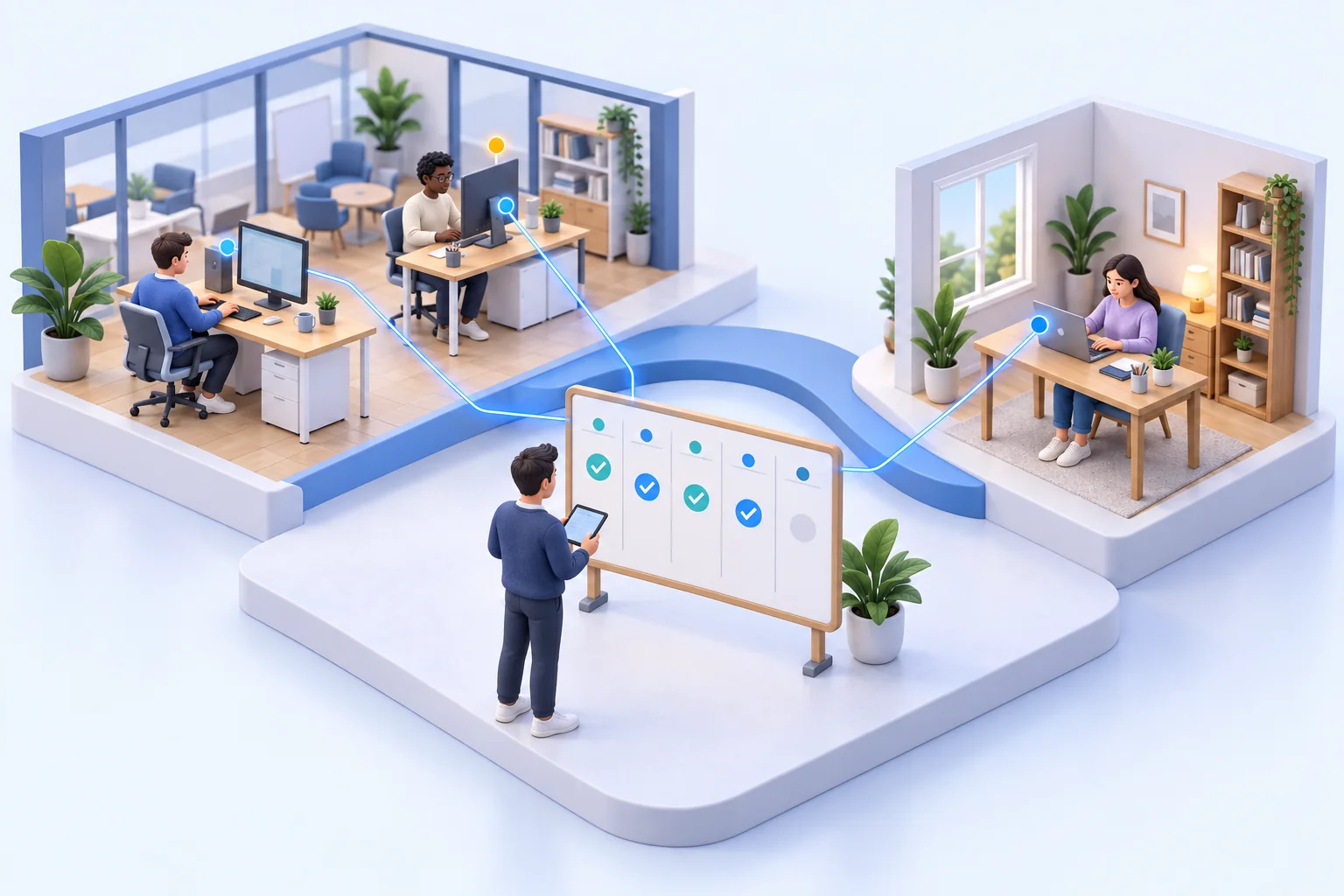
A hybrid team can look fully staffed on a calendar while critical work sits untouched, company files move to unapproved locations, and hours disappear into non-work browsing. Hybrid work oversight gives managers and IT administrators a factual view of what happens on company computers, whether the employee is at headquarters, at home, or traveling.
The goal is not to create more managerial busywork. It is to protect productive time, enforce company policy, investigate real concerns quickly, and maintain control over endpoints that no longer sit in one office. Without reliable activity records and remote administration, leaders are left managing distributed work through assumptions.
01Why hybrid work oversight is an operational requirement
Hybrid work changes the manager's line of sight. In an office, supervisors can often see whether a department is available, overloaded, or struggling with a process. Remote work removes that informal visibility. Status indicators and timesheets do not show whether a user spent three hours in a required application, encountered a system failure, or repeatedly accessed distracting sites.
That gap affects more than productivity. A remote endpoint can contain customer data, financial documents, credentials, source files, and internal communications. If unauthorized software is installed, sensitive files are copied, or a user ignores security rules, the company needs evidence and a way to respond. Waiting until an incident becomes visible through a missed deadline or breach alert is expensive.
Effective oversight provides three things: visibility into activity, records that support decisions, and controls that allow administrators to act. Each one matters. Screen viewing alone may identify a problem, but reports help establish patterns. Reports may identify risky behavior, but restrictions and remote commands help address it.
The challenge is continuity. The same employee may use an office network on Monday, home Wi-Fi on Tuesday, and a second monitor at a shared desk on Wednesday. Work expectations should remain clear across those changes. IT also needs to know whether the company computer is reachable, whether its configured controls still apply, and whether a support issue has followed it from one location to another.
02Use a weekly office-to-home review routine
Use the same work expectations wherever the employee is located. This sample week is an operating routine, not a requirement for continuous screen viewing.
- Monday, office: the manager agrees deliverables, coverage hours and handoff owners. IT confirms that the assigned company device and approved support connection are ready for the next remote day.
- Tuesday, home: the employee reports a recurring application timeout. IT owns the connection or application check; the manager adjusts the immediate handoff. An unavailable screen remains a technical state until checked.
- Wednesday, handoff: the receiving colleague confirms the work item, outstanding question and next owner. A chat status indicator does not replace that confirmation.
- Friday, review: compare completed work and unresolved delays with the agreed plan. Review relevant activity only for a defined question, record the explanation and assign a follow-up date.
Keep one issue record across location changes so the employee does not repeat the same diagnosis to different people. Separate agreed availability, device reachability and completed work: each answers a different question.
The remote deployment guide provides connection tests. The responsibility guide defines review and escalation roles; the productivity guide helps measure whether a process change improved output.
03Build hybrid work oversight around clear policies
Monitoring technology cannot replace a written workplace monitoring policy. Employees should understand that company-owned systems may be monitored, what types of activity are recorded, the business reasons for collection, and who can access the resulting data. Requirements vary by state, role, collective bargaining agreement, customer contract, and whether personal devices are involved. Employers should obtain legal guidance before deployment, especially for audio recording, keystroke logging, and employees in jurisdictions with specific notice or consent rules.
A useful policy also defines acceptable use. Spell out which applications are approved, whether personal web use is allowed during breaks, where business files may be stored, and which tools are prohibited. The more specific the rules, the easier it is to distinguish a minor exception from a meaningful security or performance problem.
Access to monitoring records should be limited. Department managers may need productivity reports for their own teams, while detailed recordings and keystroke data should be available only to authorized personnel handling a documented issue. Retention periods should match the business purpose. Keeping every recording forever creates unnecessary storage expense and increases the amount of sensitive material that must be protected. Implement these access boundaries through the permissions available in the software, administrator workstations, and storage systems; do not assume every role or approval workflow is built into the monitoring tool.
For home working, define working-hour boundaries, treatment of personal use, and how employees can question an inaccurate interpretation. Start with the least intrusive information that addresses the stated purpose. For UK employers, the ICO monitoring-workers checklists cover necessity, lawful basis, transparency, and assessment of monitoring risks. Apply the requirements relevant to each employee’s location with appropriate legal advice.
04Keep company endpoints reachable and manageable
A monitoring-only program identifies problems but can leave administrators waiting for someone to take action. Hybrid environments need direct control over remote company computers.
Test the connection from the office and from home
Install the console and the required agent on authorized company computers, then choose a connection that fits your network. LAN, WLAN, or VPN connections require the appropriate routing and firewall configuration. The documented Cloud connection provides access over the Internet and uses a subscription-based Cloud license. Confirm the connection and licensing choice before rollout.
Test an actual move between networks. Verify that the intended computer appears, live screen updates arrive, and an approved support action succeeds. If a laptop is asleep, powered off, or disconnected, an unavailable screen is a connection state, not proof of inactivity. Previously downloaded recordings may still be available locally, but new live visibility and remote commands require a working connection.
Apply controls that match the issue
When a user repeatedly accesses prohibited websites, blocking those sites is more effective than sending repeated reminders. When unauthorized applications appear, application restrictions can reduce exposure before the behavior becomes a security incident. Device restrictions can help prevent unapproved removable media or other pathways for data loss, depending on the company's risk profile.
Remote administration also reduces the time required to support distributed staff. IT can transfer files, manage remote folders, execute commands, share a desktop, restart or shut down a computer, and address endpoint issues without asking the employee to bring a device into the office. For a small IT team, those capabilities reduce travel, downtime, and back-and-forth troubleshooting.
This is where an all-in-one system has a practical advantage. A manager can identify a pattern in activity reports, while an administrator can verify the device state and apply the necessary restriction from the same operational environment. There is less handoff, less delay, and a clearer basis for documenting what occurred.
Check the documented scope before applying Tools and Restrictions: immediate Tools actions target selected computers, while the persistent Restrictions settings described in the help apply globally to employee computers. Avoid an organization-wide restriction when an individual support action is sufficient. Record the approval, affected devices, result, and any planned rollback in your service desk.
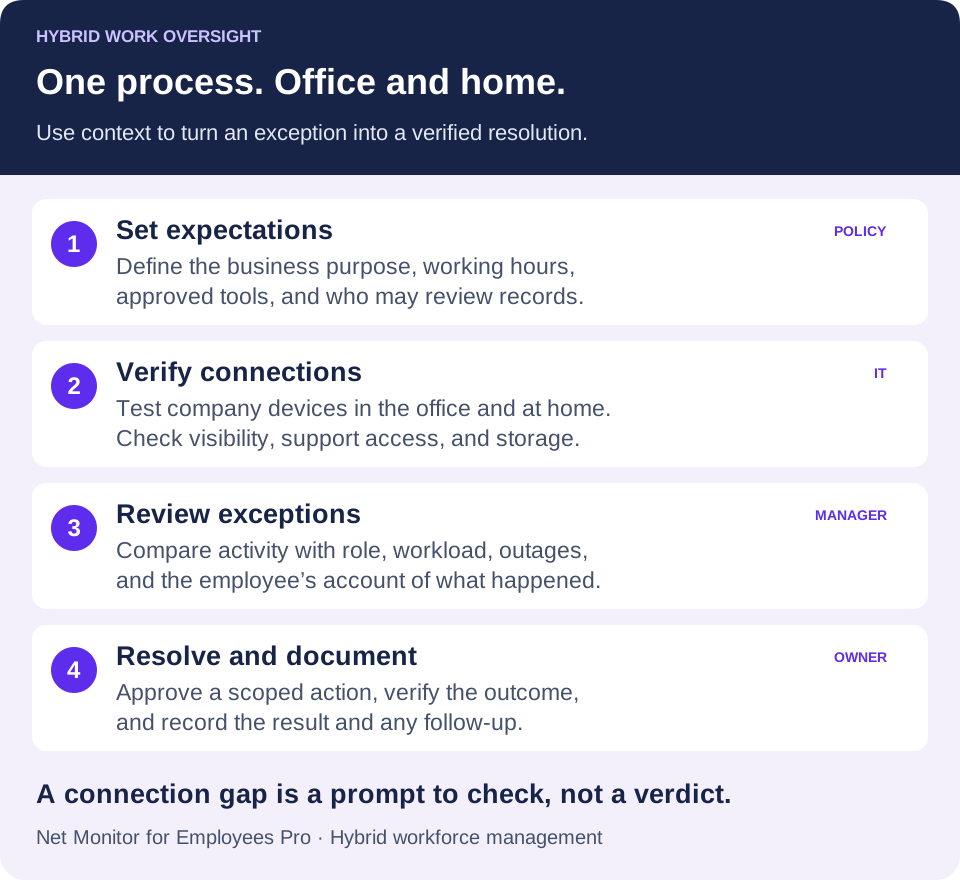
05Use reports to find exceptions and improve operations
The fastest way to waste monitoring data is to collect it without a review process. Managers should establish a reporting rhythm based on business needs. Weekly summaries may be enough for stable teams, while high-risk functions or new remote hires may require closer review during a defined period.
Start with exceptions. Look for unusual idle time, repeated visits to websites outside the approved-use policy, unexpected applications, excessive non-work browsing, or a sharp drop in activity within a role that normally has predictable workflows. Compare findings with workload, system outages, training gaps, and approved job duties before making a judgment.
Reports are also valuable for improving operations. If several employees spend excessive time switching between systems, the issue may be a broken process. If a team frequently uses an unapproved file-sharing service, the company may not have provided an accessible approved alternative. Oversight should expose management failures as readily as employee failures.
Example: a delay that follows an employee home
A support team notices slower ticket completion on home-working days. Begin with the affected time window and the employee’s explanation. Activity reports and an authorized live check may reveal repeated application timeouts, rather than distraction. IT investigates the connection or application, the manager adjusts the immediate workload, and the team compares ticket completion after the fix. If the evidence points to a policy issue instead, document the facts and follow the agreed escalation process.
Measure whether oversight resolves problems: time to restore access, recurring support incidents, policy exceptions closed, and completion of the team’s actual work. Compare people doing similar roles and account for approved leave, meetings, and system outages. Treat unexplained activity patterns as a reason to investigate, not an automatic performance verdict.
06Protect monitoring records and plan for connection gaps
Activity records may contain screens with customer information, payroll details, passwords, internal conversations, and proprietary files. Treat recordings and logs as sensitive company assets. Restrict administrative access, use strong account controls, and keep storage under company control.
Storage flexibility matters when recordings grow quickly. Net Monitor for Employees Pro supports local recording storage and external storage profiles, including SMB, FTP, SFTP, WebDAV, Amazon S3-compatible storage, Google Cloud Storage, and Azure Blob Storage, subject to platform support. The right choice depends on retention rules, existing infrastructure, bandwidth, recovery requirements, and who must retrieve records during an investigation. Prefer secure supported protocols such as SFTP, WebDAV over HTTPS, or HTTPS object storage rather than unencrypted FTP.
Before broad deployment, test recording quality, storage capacity, search filters, and report usability with a small pilot group. Confirm that remote devices reconnect and that the configured reporting and recording workflow works outside the corporate network. Test what remains available during a connection outage and what becomes accessible after reconnection. A pilot also identifies policy language that employees find unclear and reveals which reports managers will actually use.
Configure retention, recording quality, and schedules for the approved purpose. Test an upload from a home network as well as the office: an internal share may require VPN access, while an external destination needs its own working connection and permissions. Platform behavior differs; for example, ChromeOS recording uses supported external destinations and does not keep recordings locally on the Chromebook.
Use the separate recording encryption settings when appropriate and protect the recovery material. A successful connection test does not establish that recordings are retained for the right period or accessible only to the right people. Verify those controls with a sample recording and a documented retrieval check.
07Pilot hybrid work oversight before expanding it
Hybrid work does not require managers to surrender authority because employees work beyond the office. It requires better evidence and faster control. Net Monitor for Employees Pro gives administrators live visibility, desktop and audio recording, detailed activity logs, reporting, and remote endpoint controls in one system built for company-managed devices.
Start with the roles and endpoints where missed visibility creates the highest cost: remote staff handling sensitive data, teams with recurring productivity issues, and devices that operate outside the office for long periods. A fully functional free trial lets IT verify reporting, recording, restrictions, and remote administration against real workflows before purchasing licenses.
Choose a small group that actually alternates between office and home. Use the pilot to answer six practical questions:
- Purpose: Which support, productivity, or policy problem are you trying to resolve, and how will you recognize improvement?
- Coverage: Does each authorized company computer connect from both locations, and are unreachable devices followed up appropriately?
- Context: Can managers relate the available activity records to agreed working hours, deliverables, and the employee’s explanation?
- Action: Can IT complete a scoped support task and verify the outcome without disrupting unrelated devices?
- Protection: Are record access, retention, storage, and any encryption settings tested?
- Ownership: Who reviews an exception, who can authorize a change, and who closes the issue?
Keep a short record of the pilot’s findings and revise the policy or configuration where needed. Expand when the process works in both locations and the team understands how it will be used. This makes hybrid workforce management repeatable as schedules, staff, and company devices change.
The most useful oversight program is the one that helps a manager address a problem while it is still small: confirm the facts, correct the behavior or process, secure the endpoint, and keep the business moving.
08Hybrid work oversight questions
How is hybrid work oversight different from remote employee monitoring?
Remote employee monitoring provides visibility into activity on managed computers. Hybrid work oversight is the broader operating process: it keeps expectations, device connectivity, reviews, and response responsibilities consistent as employees move between the office and remote locations.
Does an offline employee computer mean the employee is not working?
No. The device may be asleep, disconnected, moving between networks, or affected by a technical fault. The employee may also be in a meeting or doing approved offline work. Check the schedule, connection, and work context before interpreting a gap.
Do hybrid teams need a VPN for monitoring?
A VPN can provide the routing needed for a direct connection between the console and agent. Net Monitor for Employees Pro also offers the documented Cloud connection over the Internet, with a subscription-based Cloud license. Select and test the approach appropriate to your network and licensing needs.
Should managers watch hybrid employees’ screens all day?
Build a review rhythm around a defined business purpose. Role-based summaries, completed work, and targeted checks can help managers investigate exceptions without continuous viewing. Use more detailed records only where they are justified and covered by the applicable policy and requirements.
What should a hybrid-work pilot measure?
Check connectivity in both locations, successful support actions, useful exception reviews, and the protection of collected records. Measure operational outcomes such as faster issue resolution and fewer recurring disruptions alongside the team’s agreed deliverables.