
Internet Blocking Software for Employee Computers
Using the Monitoring Console
Internet Control can be used to enforce website access policy with centralized allow and block rules.
This feature allows managers to reduce distractions and block risky websites while still allowing approved work websites.
Typical use cases include:
- Blocking social media, streaming, or gaming websites during work hours.
- Allowing only required business websites for specific teams.
- Applying strict website rules during exams, training, or onboarding.
- Temporarily opening access for troubleshooting and then restoring policy.
- Reducing security risk by blocking known dangerous websites.
Internet Control
Internet Control enforces website policy on remote computers with allow/block modes, URL and keyword lists, and configurable blocked-site actions.
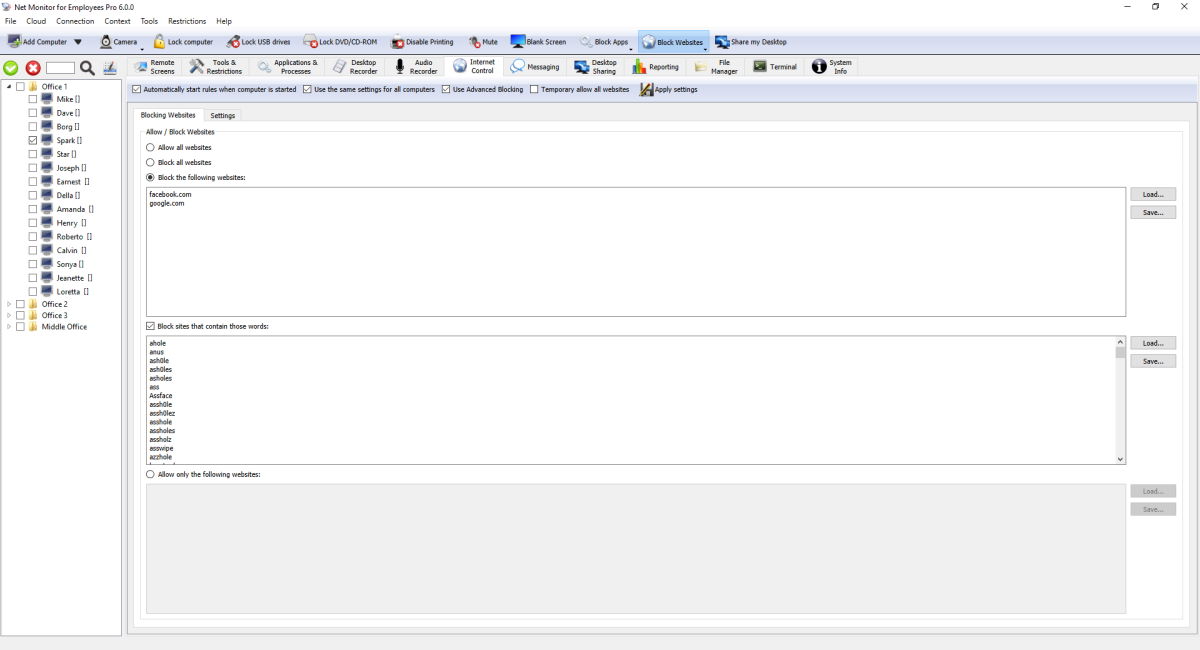
Top Bar Settings
- Automatically start rules when computer is started makes policy persistent after restart.
- Use the same settings for all computers applies one global profile instead of per-computer policy.
- Use Advanced Blocking enables lower-level filtering behavior.
- Temporary allow all websites temporarily bypasses blocking until policy is re-applied.
- Apply settings confirms and pushes current configuration.
Blocking Websites Tab
- Choose how internet access should work: allow all websites, block all websites, block only listed websites, or allow only listed websites.
- Add website addresses to your allow list or block list.
- Use Load... and Save... to import or export your website lists.
- Block sites that contain those words blocks websites that include selected words in the address.
Settings Tab (Blocked-Site Behavior)
- Show message: display custom message in browser.
- Redirect: redirect browser to configured URL.
- Close browser: closes browser that opened blocked website.
Ready to start monitoring your employees?
Buy this application now. You will never regret your decision.
Buy Now