Employee productivity / Practical guide
Employee Productivity Monitoring Tools: Find Bottlenecks
Use employee productivity monitoring tools to locate workflow bottlenecks. Compare activity, completed work, quality and waiting time in a practical example.

Employee productivity monitoring tools are most useful when a team is busy but work still queues up. Application time and idle periods can point to slow approvals, duplicate entry, or unreliable software. Compare those signals with completed tasks and quality measures to identify the bottleneck before judging individual effort.
For small and midsize businesses, the goal is not to watch every employee for its own sake. The goal is to protect paid work time, company data, customer information, and the systems required to keep operations moving. The right platform shows where work is happening, where it is stopping, and where management needs to intervene.
01Measure workflow bottlenecks with productivity monitoring tools
Begin with a business outcome, a quality measure and a waiting interval. Completed invoices, correction rates and approval times come from the relevant work system. Computer activity helps locate questions to investigate; it does not calculate output or explain every delay by itself.
At a minimum, administrators need visibility into application use, website activity, active and idle time, processes running on company computers, and employee screen activity. Reports should be filterable by user, department, date, application, website, or activity type. Without useful filters, monitoring data becomes a large archive that managers do not have time to review.
Screen viewing and recording add necessary context. A report may show that an employee spent three hours in a browser, but a screen record can distinguish legitimate customer research from streaming video, personal shopping, or an unapproved web application. Live screen monitoring is equally useful when a manager needs to confirm that a new process is being followed or determine why a task is delayed.
The most practical systems also move beyond observation. If an employee is using a prohibited website or unapproved application, administrators should be able to block it. If a remote computer has a problem, IT should be able to connect, transfer a required file, restart the machine, run a command, or restrict a device without waiting for the employee to bring the endpoint into the office.
02Choose a process change that addresses the cause
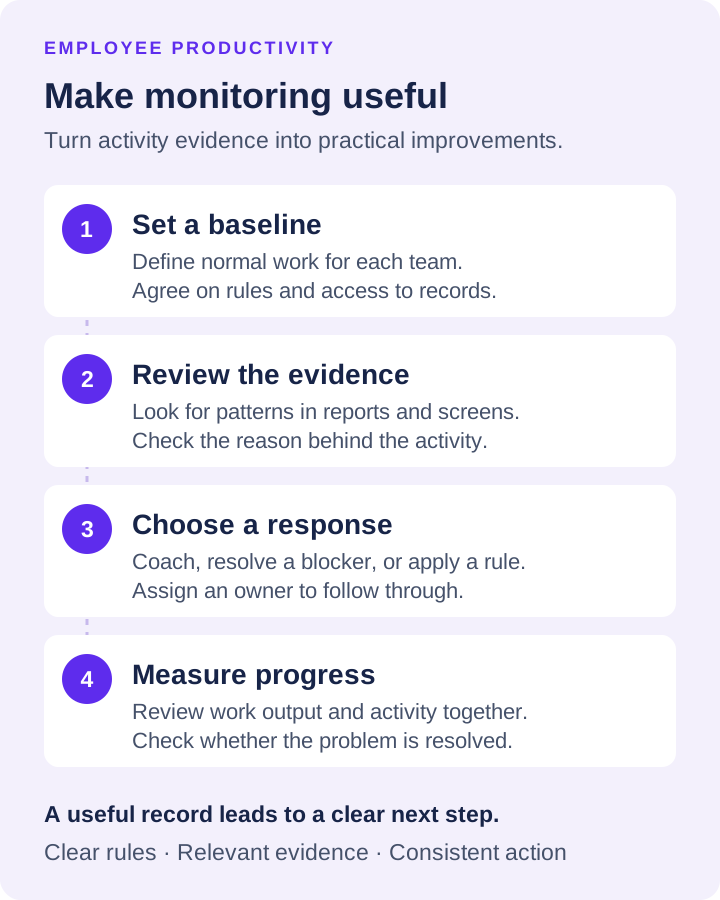
Collecting activity data without a response plan wastes administrative time. Before deploying software, decide which events require a manager conversation, an IT response, or an immediate restriction. This keeps monitoring focused on business outcomes rather than minor variations in individual work habits.
For example, frequent idle time may point to time theft, but it can also reveal a broken workflow. A customer service representative may be waiting for access to a system, an approval, or a response from another department. Repeated use of a personal file-sharing site may signal misconduct, or it may show that employees lack an approved way to exchange large files. The record matters, but the reason behind the record matters too.
Managers should use monitoring results to identify patterns. One isolated visit to a non-work website is rarely a priority. A recurring pattern of extended personal browsing during paid hours is different. Likewise, one unauthorized application may be a training issue. The same unapproved software installed across several devices may indicate a policy gap or a serious security exposure.
This approach protects productive employees as well. Clear evidence prevents managers from making decisions based on rumors, visible office presence, or the person who speaks most often in meetings. Work output and documented activity provide a more defensible basis for coaching, recognition, and corrective action.
03Worked example: reduce an invoice approval bottleneck
The following figures are fictional and illustrate a review method, not a customer result or promised improvement. An accounts team processes comparable invoices over two five-day periods. Activity reports locate intervals worth examining; the finance system supplies completion and correction counts.
- Baseline: 100 completed invoices, 8 requiring correction, and a median approval wait of 40 minutes. Application records show repeated returns to the same invoice screen. That pattern alone does not prove why approval was delayed.
- Check the cause: compare a sample of invoice timestamps with the approval queue and speak to the team. In this example, requests wait for an unavailable approver. Preserve exceptions such as unusually complex invoices rather than treating every case as equivalent.
- Change one step: assign a backup approver and a documented handoff. Keep staffing, work mix and measurement definitions comparable. Do not add website restrictions to an approval problem.
- Review the next period: 120 invoices completed, 6 requiring correction, and a median approval wait of 20 minutes. Throughput increased by 20%; the correction rate changed from 8% to 5%, a decrease of 3 percentage points.
These figures support further review of the changed process; they do not isolate every possible cause. Check workload complexity, overtime, staffing changes and customer outcomes before attributing the entire difference to one intervention. A quieter keyboard can be a positive result if duplicate entry was removed.
Keep a worksheet with the business outcome, activity signal, independent source, explanation, owner, change and review date. For support teams, use resolved cases and reopened cases; for sales, use qualified follow-ups and accurate records. Choose measures that reflect the role, not a universal activity score.
Use the application report guide to interpret program records and the idle-time guide to distinguish input gaps from downtime. Escalate actual device faults through endpoint troubleshooting.
04Set Rules Before You Turn Monitoring On
A monitoring deployment should begin with a written policy, not a surprise. Employees should understand that company-owned devices and accounts are used for business purposes, what activity may be monitored, who can access the records, and how long records are retained. Requirements differ by location and circumstance, so consult qualified legal counsel on notice, consent, recording, and privacy obligations that apply to your workforce.
Operationally, define roles inside the platform. Department managers may need productivity reports and live-screen access for their teams. IT administrators may need process data, endpoint controls, and remote management authority. Security personnel may need access to investigation records. Not every supervisor needs access to keystrokes, recordings, or every employee's screen.
Start with a baseline period. Review normal use of approved applications, common websites, idle patterns, and typical work hours before setting alerts or restrictions. A design team, a sales team, and an accounting team will not have the same activity profile. Baselines prevent the system from flagging legitimate work simply because it looks different from another department's work.
05A Practical Rollout for Small and Midsize Businesses
Begin with a limited group of company computers, preferably a department with a defined workflow and a manager prepared to review the results. Test reports, recording settings, storage destinations, and remote-control permissions. Confirm that data is accessible when needed and that the system does not create an unmanageable volume of alerts or recordings.
Then establish a review cadence. Managers may review productivity reports weekly, while IT reviews unauthorized applications and security-related events daily or as alerts occur. Critical policy violations should have an assigned owner and a documented response process. If nobody owns the response, the monitoring system will become another dashboard that employees learn to ignore.
Net Monitor for Employees Pro is designed for this hands-on model, combining screen visibility, recording, detailed activity logs, content restrictions, and remote administration in one administrator-focused system. A fully functional no-registration trial gives IT teams a direct way to test whether its controls and reporting fit their environment before licensing.
The useful question is not whether a business should collect more employee data. It is whether management can turn verified activity into faster decisions, safer endpoints, and better use of paid time. Set clear rules, monitor the systems you own, and act consistently when the evidence shows a problem.