Workforce surveillance / Practical guide
Workforce Surveillance: Roles, Reviews and Controls
Organize workforce surveillance with clear manager, IT, HR and security responsibilities, review thresholds and proportionate responses to verified concerns.

A missed deadline rarely starts with one obvious failure. It can begin with scattered distractions, unauthorized tools, an unrecorded file transfer, or a remote endpoint nobody has checked for weeks. Workforce surveillance gives managers and IT teams activity records to help identify those problems, verify what happened, and take corrective action before the impact spreads.
For small and midsize businesses, the goal is to protect paid work time, company systems, customer data, and operational standards. The right approach turns otherwise invisible endpoint activity into records managers can review, filter, and discuss. Its value comes from the decisions those records support, not simply from collecting more of them.
What is workforce surveillance?
Workforce surveillance is the systematic observation and review of work-related activity. In this guide, it means monitoring authorized company computers through activity reports, live screens, and recordings. Used with clear policies and human review, these records can help investigate productivity gaps, check policy risks, and decide which support or endpoint controls are needed.
01Assign owners before reviewing workforce activity
A useful workforce surveillance program defines who can ask a question, who verifies the evidence and who authorizes the response. The following responsibility model is an example of an organizational process, not a claim that these approval roles are built into the software.
- Manager: identifies the work question, compares the available activity with assignments and output, and asks the employee for context. The manager records an unresolved concern rather than declaring misconduct from an idle interval.
- IT: checks device, user, time range and collection coverage; investigates technical causes; and applies an approved, scoped support action. IT verifies the result and records significant changes.
- HR or the designated reviewer: checks policy consistency, employee explanations and the appropriate management process before a personnel decision.
- Security: evaluates credible data or account risks, identifies corroborating sources, preserves relevant evidence and coordinates incident containment.
Follow a clear path: question → coverage check → corroboration → authorized action → verification → closure. If the evidence remains incomplete, document what is unknown and who will resolve it. Urgent containment follows the incident procedure; routine performance concerns follow the management process.
Use the policy guide to document collection boundaries and the worked evidence example to separate observations, explanations and findings. Review access and open cases periodically so an old investigation does not become unlimited monitoring. For a purchasing decision, use the software evaluation worksheet.
02Use workforce surveillance to explain productivity gaps
Productivity problems can leave activity patterns before they appear in output reports. A salesperson may spend long periods in non-work applications. A support employee may switch repeatedly between a ticket and a slow internal tool. A remote worker may remain signed in while the computer records little input. Screen viewing and application reports help managers investigate whether these are isolated events, recurring distractions, or a workflow that needs repair.
Broad accusations damage morale and rarely solve the underlying problem. A filtered activity report helps narrow a review to a person, team, or workflow, but it does not establish the cause on its own. Managers can compare the record with work assignments, delays, and the employee’s account, then address specific behavior, revise an unclear process, or provide training where it is needed.
Separate computer activity from completed work
An idle period may include a customer call, reading, a meeting, or waiting for an approval. An application left open does not establish sustained attention, and a high activity total does not prove quality. Use the idle-time review guide when investigating gaps, and pair endpoint signals with relevant outcomes such as resolved cases, accurate orders, or completed project milestones.
For example, consider a support team whose customer responses are slowing down. A reviewer finds repeated gaps between ticket updates. The matching application records and a discussion with the team show that employees are waiting for supervisor approvals. The useful intervention is to clarify approval ownership and turnaround expectations. If the evidence instead shows repeated unrelated browsing during assigned support work, coaching or a targeted website restriction may be appropriate. The same activity signal can lead to different actions.
Security is another immediate use case. Insider risk does not always look like deliberate theft. It may involve an employee using personal email for company documents, an unapproved file-sharing service, a removable device, or a browser extension with excessive permissions. Website logs, process information, relevant desktop recordings, and device controls can support the investigation. A visited URL or an open file-sharing page does not by itself prove that a file was transferred; corroborate suspected transfers with records from the relevant service or security system.
In regulated work or sensitive client environments, retained records can also support internal reviews. A dated report, a relevant recording, and a documented control test provide more context than a verbal claim that someone checked. Keep the source and review notes with the evidence. Monitoring software alone does not establish regulatory compliance or guarantee that a record will meet a particular legal standard.
03Set a workforce surveillance policy before collecting records
Workforce surveillance works best when it is tied to written business rules. Employees should understand the authorized uses of company devices and accounts, what activity may be monitored, when monitoring applies, who can access records, and how the organization handles concerns or violations. Clear notice and a consistent explanation support better management. The workplace surveillance policy guide provides a framework for documenting those choices.
Match the scope to the risk and purpose. A company handling financial data, health information, intellectual property, or customer records may need different evidence from a business using computers mainly for scheduling and email. Greater sensitivity does not automatically justify collecting more data or keeping it longer. Remote endpoints also need a deployment and access model that works beyond the office network.
Review applicable local, national, contractual, and industry requirements before deployment. Monitoring rules, employee-notice obligations, labor agreements, and audio-recording requirements can differ by location and activity. Have the appropriate legal or privacy adviser assess the proposed scope. Company ownership of a computer does not remove employee privacy considerations, and employee acknowledgment alone should not be treated as blanket permission for every monitoring method.
As one jurisdiction-specific reference, the UK Information Commissioner’s Office explains the importance of a lawful basis, transparency, necessity, and proportionality in its guidance on monitoring workers. The ICO currently marks that guidance as under review following legislative changes. Check current requirements for your own workforce rather than treating a single country’s guidance as a universal rule.
Assign responsibility before collecting detailed activity data. Decide who reviews reports or supported alerts, which findings justify investigation, who can approve a restriction, and when records are deleted. Separate routine manager reviews from sensitive HR or security investigations. A smaller evidence set with an owner and a clear retention rule is often more useful than an uncontrolled archive nobody can search.
04Turn monitoring evidence into a documented response
A practical workforce surveillance workflow is observe, verify, act, and document. An administrator or manager identifies an unusual pattern, checks the relevant records and business context, takes a proportionate action, and records the outcome. The action may be coaching, technical support, a process change, or an endpoint restriction. Confirm the explanation before treating a productivity signal as misconduct.
Consider an employee repeatedly using an unapproved file-sharing service. The explanation may be carelessness, an unclear rule, an unavailable approved tool, or an attempt to bypass security. Review the available website and application records, preserve relevant evidence, and confirm the business need. IT can then block the site, inspect running processes, assess related file activity where logs exist, and apply appropriate device restrictions. If data loss is suspected, involve the security owner promptly and follow the incident process rather than making unsupported conclusions from browsing history.
The same approach applies to productivity. If reporting shows recurring use of games, streaming sites, or social platforms during assigned work, determine whether that use was permitted, work-related, isolated, or persistent. Managers can address the cause and apply suitable website or application restrictions instead of repeatedly reviewing the same unexplained pattern. Retest approved tools and any documented exceptions after a restriction changes.
Check what a control changes before applying it
Use Internet Control for supported website rules and Applications and Processes for application and process actions. Review scope carefully: the Tools and Restrictions help distinguishes immediate actions on selected computers from persistent restrictions applied globally. A narrowly scoped investigation should not accidentally interrupt unrelated teams.
Remote administration reduces the time needed to act. Relevant functions include remote file management, power controls, command execution, device restrictions, and desktop sharing. IT may resolve a distributed employee’s problem without waiting for the device to return to the office. Test the supported action on the actual operating system and connection, record significant changes in the service ticket, and verify the device’s state afterward. During a security incident, preserve necessary evidence before disruptive changes.
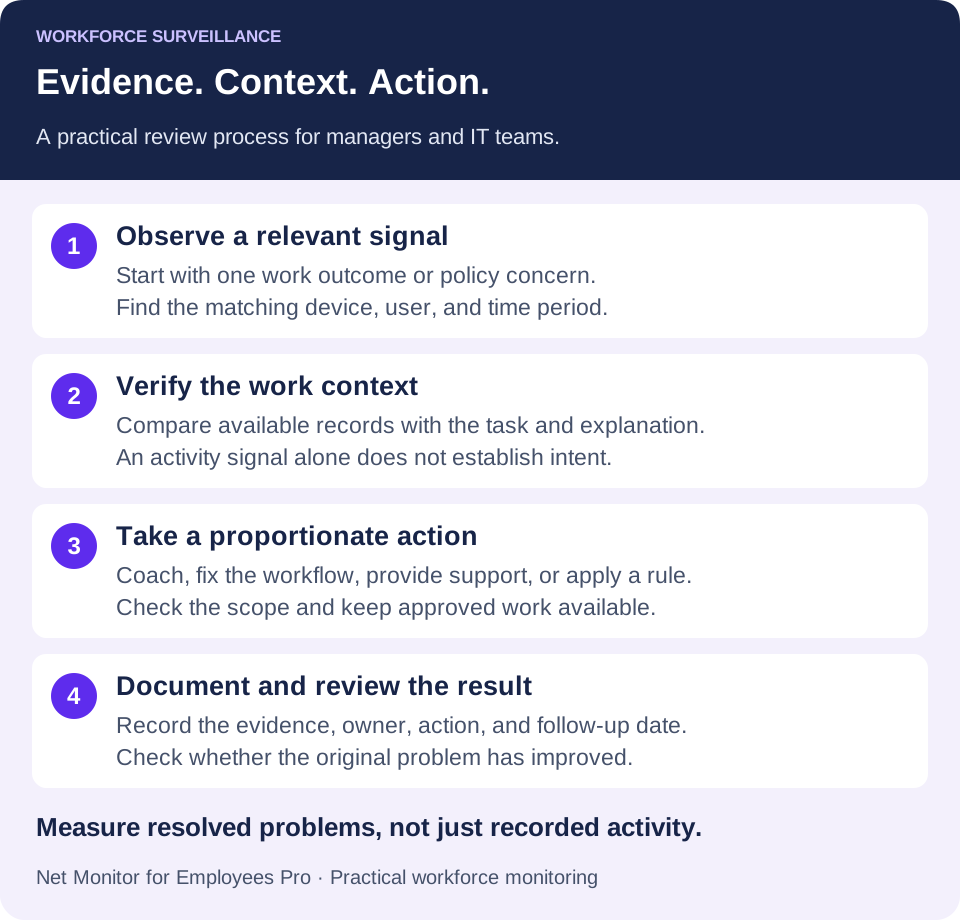
A concise review record should identify the issue, computer and user where known, time range, evidence source, reviewer, employee explanation where relevant, action, and follow-up date. Keep this in your approved case or service-management process; do not assume the monitoring tool automatically records every administrative decision.
05Keep recordings and reports usable, protected, and time-limited
Desktop recordings, screenshots, reports, and logs can consume significant storage. Audio recordings add further sensitivity and should be a separately justified choice, not a default productivity setting. Retention planning determines whether relevant evidence is available when an authorized complaint, incident, or management review occurs. It also determines how much unnecessary historical data the business retains.
Choose retention periods based on the approved purpose, applicable requirements, risk, storage cost, and investigative needs. Protect relevant records against unauthorized access, alteration, or deletion, and limit access to people with a defined management, HR, security, or IT role. Preserve incident evidence through an approved process before routine cleanup removes it. Avoid keeping the entire workforce’s detailed history indefinitely because one case might need longer retention.
Assign an owner to approve recording access and review retention. Check actual storage permissions and recovery arrangements; responsibility does not come from a provider name.
Check platform coverage in the external recording storage guide. ChromeOS recordings use supported S3, Google Cloud Storage, Azure Blob Storage, or WebDAV profiles; they do not use local Chromebook recording storage or SMB, FTP, and SFTP profiles. Test a representative device, upload, playback, and recovery path before relying on the archive.
Treat recording retention and reporting retention separately
The Screen Recorder help describes recording quotas that can stop recording or delete the oldest files. The Reporting help describes separate activity-log retention and report filters. A storage quota is not a guaranteed number of retention days. Check which records will remain available at your expected volume, and verify deletion behavior instead of assuming all data types follow one rule.
Recording encryption is also separate from the storage destination. Follow the recording encryption guidance and protect the required private-key backups. An encrypted file is not useful evidence if every key needed to play it has been lost. Encryption of recordings should not be described as automatic protection for every exported report or other file in the review process.
Do not treat storage as a dumping ground. Use meaningful computer names and supported user, date-range, and application filters so an administrator can locate relevant activity promptly. Keep reviewer notes and case references in a controlled system. Evidence that takes days to find is much less useful during an active incident.
06Measure the value of a focused workforce monitoring pilot
Start with one team and one operational question. For a support team, that might be why cases wait between assignment and first response. For IT, it might be how long it takes to identify and resolve recurring unauthorized application use. Define success before enabling collection, then review a representative working period with the team’s normal workload in mind.
- Work outcome: compare response time, completed tasks, accuracy, or another relevant result using the system that owns that measure.
- Resolution time: track how long a flagged issue takes to verify, assign, and resolve.
- Review effort: record the manager or technician time needed to find useful evidence.
- Disruption: count legitimate work blocked by a rule, exception requests, and repeat support problems.
- Evidence coverage: check whether the required report or recording is available, correctly scoped, and retrievable when needed.
These measures belong in the pilot review; they are not a claim that the software automatically calculates business results or causal productivity gains. Compare similar periods and note workload, staffing, and process changes. A useful outcome could be faster issue resolution or fewer repeated interruptions, even if total keyboard activity stays the same.
Avoid collecting more than you can use
The first common failure is over-monitoring without a purpose. Recording everything indefinitely creates privacy concerns, storage expense, and review burdens. Monitor what is needed to enforce the agreed policy, investigate relevant issues, and manage company resources. Adjust collection detail and retention to actual risk, and remove collection that does not support a defined decision.
Give every useful finding an owner
The second failure is monitoring without follow-through. If repeated policy problems are observed but never addressed, the control process loses credibility. Establish a consistent approach to coaching, documenting findings, applying restrictions, and escalating serious cases. Consistency means applying the same review standards and considering context; it does not require the same response to every event.
Net Monitor for Employees Pro supports this operational model with live screen visibility, recordings, activity reports, website and application restrictions, and remote endpoint controls. The free trial lets IT evaluate the relevant visibility, storage, and control workflows on authorized company computers before choosing licenses. Confirm the features and platform coverage your team needs during the trial.
Start with a defined business problem: recurring distraction, weak remote visibility, unauthorized software, data-handling concerns, or slow IT response. Configure workforce surveillance around that problem, make the review and response process clear, and check results regularly. When activity evidence leads to a verified explanation and a useful action, it can support both productivity and security.
07Workforce surveillance: common questions
How is workforce surveillance different from time tracking?
Basic time tracking records attendance or reported hours. Workforce surveillance can add endpoint context such as applications, websites, live screens, and recordings. That context helps investigate work patterns, but neither attendance nor computer activity alone proves the quality or quantity of completed work.
Can workforce surveillance improve employee productivity?
It can help identify a bottleneck, repeated distraction, or technical problem that managers can address. Improvement depends on the action taken and the work outcome measured. Use a focused pilot and compare relevant business results; do not assume installing monitoring software guarantees an increase.
Do you need continuous screen recording or keystroke logging?
No. Start with the least detailed evidence that answers the approved business question. Application and website reports may be sufficient for a routine review. More detailed recording or keystroke collection needs its own justified scope, access controls, and assessment of applicable requirements.
How long should workforce surveillance records be kept?
There is no single retention period suitable for every organization or record type. Set a documented period based on purpose and applicable requirements, distinguish routine records from incident evidence, and verify the separate cleanup settings for reports and recordings.
What should a small business test before buying monitoring software?
Test one complete workflow: locate a relevant activity record, verify it with work context, apply a supported action if needed, and retrieve the evidence later. Check remote connectivity, platform support, storage behavior, reviewer access, and the effect on legitimate work before expanding the rollout.