Workplace monitoring policy / Practical guide
Workplace Surveillance Policy: A Practical Checklist
Build a workplace surveillance policy covering purpose, devices, collected data, access, retention, notice, and a check that technical settings match the policy.

A manager discovers that a remote employee has spent hours on streaming sites. IT finds unapproved remote-access software on a company laptop. A customer file is copied to a personal cloud account. Without a clear workplace surveillance policy, these incidents become arguments about expectations instead of decisions supported by facts.
Monitoring tools provide visibility. Policy determines when that visibility is used, what is collected, who can access it, and how the business will act on what it finds. For small and midsize organizations, that distinction matters. A vague statement that employees “may be monitored” does not give managers a practical operating standard or provide a reliable basis for decisions when a productivity, security, or disciplinary issue appears.
01What a workplace surveillance policy must do
A workable workplace surveillance policy has two jobs: protect company assets and set boundaries that employees can understand. Explain which company-owned devices, networks, accounts, and business data are provided for work purposes and which monitoring, logging, restrictions, or reviews apply. Connect each practice to a defined operational, security, compliance, or investigative purpose. Owning a device does not by itself justify unlimited surveillance.
The policy should also remove uncertainty. Employees need to know whether the company records screen activity, tracks websites and applications, captures keystrokes, logs file activity, records audio, or monitors devices used away from the office. If a capability is deployed, say so plainly. Hidden assumptions create avoidable disputes and weaken employee acknowledgment.
This is not an invitation to collect every possible data point just because software makes it available. The right level of monitoring depends on the role, the sensitivity of the data, the device ownership model, and the business risk. A finance workstation handling payroll data may warrant tighter controls than a shared conference-room computer. A company laptop used from a home office requires different boundaries than a personally owned device enrolled for limited access.
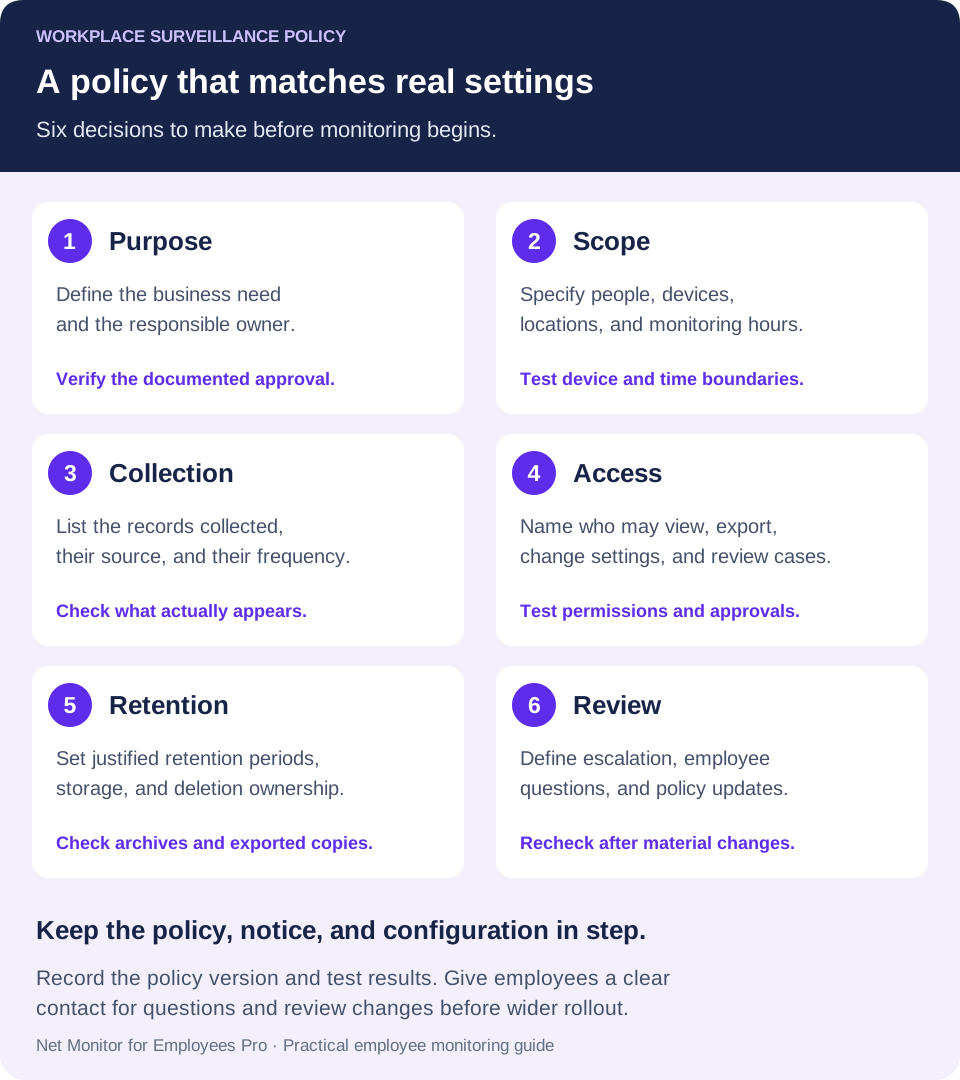
02Define the devices, people, and hours covered
Start with the assets and activities covered by the policy. Be specific about company-owned computers, mobile devices, servers, email accounts, collaboration platforms, VPN connections, cloud applications, removable media, and company networks. If the business permits personal devices, define whether monitoring applies only within a managed work profile, virtual desktop, or approved business application. Name the employee groups and locations covered, too. Confirm that your technical setup can enforce the boundary you describe; a work-profile promise is not useful if the software captures the entire personal device.
A sound policy should distinguish business activity from personal space. For example, the company may state that monitoring occurs on company equipment and company systems, including when used remotely, while avoiding surveillance of personal devices or personal accounts outside approved work environments. Make the boundary explicit in the policy and verify it in the actual deployment.
It should also address off-hours use. If employees are permitted to use company laptops personally, say whether monitoring continues during that use and whether they should expect personal activity on the device to be visible. Many organizations reduce risk by limiting personal use of company equipment instead of trying to sort business activity from private activity after the fact. A notice that personal activity may be visible does not make every collection appropriate. Set and test the permitted monitoring periods, including what happens when a device reconnects or an employee works a different shift.
03State exactly what employee monitoring collects
Do not bury collection practices in broad legal language. Identify the categories of information your deployed systems actually collect, such as screen images or recordings, active applications, visited websites, search activity, file transfers, login and logout times, process activity, device connections, and security events. Describe whether each category is collected continuously, on a schedule, or only after an authorized action. Distinguish live viewing from stored recordings and tell employees whether information is collected while they work remotely.
Audio recording, webcam use, and keystroke logging deserve separate review because they can capture private conversations, credentials, and other sensitive information. Assess whether a less intrusive method would meet the same purpose. Enable a capability only when its use has a documented justification, tightly controlled access, and the necessary legal review, notice, and permissions. Listing a feature in a policy is not sufficient authorization to use it.
The policy should make clear that the company may block websites, applications, external storage, unauthorized software, or unsafe device functions. Monitoring without enforcement leaves managers watching the same problem repeat. If social media, gaming sites, unauthorized cloud storage, or remote-control tools create a risk, define who may approve restrictions, the devices affected, and how employees request an exception for legitimate work.
Check the Desktop Recorder settings separately from the reporting settings. A screen-recording schedule does not, by itself, establish the collection period for website, application, or keystroke reports. For device restrictions, the Tools and Restrictions help explains the difference between immediate actions on selected computers and persistent restrictions that apply globally to employee computers.
04Set a business purpose for every control
Employees are more likely to follow a policy that connects surveillance to real business needs. State the intended outcome: verify work activity, protect confidential data, detect unauthorized software, investigate incidents, enforce acceptable-use rules, and maintain a record when management action is necessary.
That purpose should guide deployment. Live screen viewing may help a manager support a new employee, confirm that a remote workstation is functioning, or investigate a suspected policy violation. Website and application reports can identify patterns that warrant a review of nonwork browsing, unapproved software, or a workflow bottleneck. Where your security systems collect them, file-access and process logs may help investigate movement outside approved systems. Activity records add context; they do not automatically prove time theft or a file transfer.
Avoid making productivity reporting the only objective. A person can appear active while producing poor work, and someone may show less keyboard activity while solving a complex customer or technical problem. Reports should inform management judgment, not replace it. Review the employee’s role, assigned workload, deadlines, output quality, and documented expectations before treating activity data as proof of poor performance.
For example, if the concern is unauthorized file-sharing software, start by identifying the application, assessing its business use, and applying an approved application rule. Continuous audio capture would collect different, much more intrusive information and would not be a proportionate substitute for that application-control task. Document the reason for each collection choice before rollout.
05Control access, retention, and storage of records
Surveillance records are sensitive business information. A policy should name the roles authorized to view live screens, review recordings, export reports, change monitoring settings, and approve investigations. In most small businesses, that group should be limited to designated IT administrators, security personnel, senior operations leaders, and managers with a documented need to know.
Limiting access by role helps prevent casual browsing and reduces the chance that monitoring data becomes an internal privacy problem. Require administrators to use individual accounts, protect credentials, and keep an audit trail of administrative actions where possible. Managers should not be able to review employee records simply out of curiosity. Map these responsibilities to permissions available in the monitoring tool, administrator workstations, and storage system. If a desired approval or audit control is not built into the tool, document the separate process that supplies it.
Retention rules matter as well. Set a justified period for each record type, based on its purpose and applicable requirements, rather than keeping everything in case it becomes useful. Do not retain everything forever. Longer retention increases storage costs, expands the impact of a breach, and makes records harder to manage. Set different retention periods for routine activity reports, security alerts, and evidence preserved for an active investigation or legal hold.
For distributed teams, determine where recordings and reports are stored and who controls that storage. Use approved repositories with defined permissions rather than allowing uncontrolled copies across administrator desktops. Organizations using cloud storage should document approved storage destinations, encryption requirements, and deletion procedures.
In Net Monitor for Employees Pro, verify recording retention and report retention separately, including copies held on employee computers, in the console archive, and in any approved external destination. Recording encryption is configured independently of the storage location; do not assume it encrypts every activity report or exported file. Assign someone to test deletion, protect key backups, and manage preserved incident evidence.
06Make employee notice and acknowledgment operational
Give employees the policy before monitoring begins, during onboarding, and whenever the policy changes materially. Where appropriate or required, obtain a signed or electronic acknowledgment confirming that the employee received the policy, understands that company systems may be monitored, and agrees to follow acceptable-use requirements.
An acknowledgment can document receipt and help reduce ambiguity. It is not the same as freely given consent, does not waive employee rights, and does not make an otherwise unlawful monitoring practice permissible. For remote employees, include consistent information in remote-work agreements and device-assignment forms. Keep the policy version, delivery date, and acknowledgment record, and give employees a contact for questions, access requests, or concerns.
US federal, state, and local rules can affect monitoring practices, especially for audio recording, electronic communications, biometric data, notice requirements, and employees located in states different from the company headquarters. Union agreements, customer contracts, and sector-specific regulations can add further restrictions. Have qualified employment and privacy counsel review the policy and the planned configuration before deployment, particularly if monitoring includes audio, keystrokes, personal devices, or employees in multiple jurisdictions. This guide provides an operational framework, not a jurisdiction-specific legal policy.
Check the rules where employees work
Requirements vary. For example, New York’s electronic monitoring notice law requires covered private employers with a place of business in the state to give affected employees prior written notice upon hiring, obtain acknowledgment, and post a notice for covered monitoring. Its scope and exceptions matter; do not treat that example as a nationwide rule.
For UK deployments, the ICO’s worker-monitoring guidance addresses lawful basis, transparency, necessity, and proportionality, and explains why consent is usually unsuitable in an employment relationship. The ICO currently marks this guidance as under review following legislative changes. Check the current requirements with your advisers before finalizing the policy and configuration.
07Turn the policy into a repeatable management process
A policy fails when it sits in an employee handbook while monitoring is configured inconsistently. Establish a simple process for routine review and escalation. Managers should use regular reports to identify patterns, not to react to one unusual hour. IT should investigate security indicators, unauthorized applications, and suspicious file movement. Serious findings should be documented, preserved, and routed to the appropriate manager, HR leader, security owner, or counsel. Record the reason for a review, its approved scope, the reviewer, and the outcome. Give the employee an appropriate opportunity to explain activity before drawing a performance conclusion.
Use graduated action when the issue is ordinary misuse rather than deliberate misconduct. A first instance of excessive nonwork browsing may call for coaching and a reminder of the policy. Repeated behavior may justify tighter restrictions or formal discipline. Credible evidence of data theft, credential sharing, malware installation, or intentional record deletion requires a faster security response.
The policy assigns authority and review boundaries. Use the incident documentation example for the separate task of recording observations, employee explanations, and findings.
Review the policy at least annually and after any major change in remote-work practices, device ownership, security incidents, or monitoring technology. The best policy is not the longest one. It is the one managers can apply consistently, employees can understand, and IT can enforce without creating new risk. Assign an owner and a review date. Recheck the settings as well as the wording whenever a new capability is enabled or a new group of employees is added.
08Workplace surveillance policy checklist before rollout
Use this outline to review your draft with IT, HR, and the people responsible for privacy and employment requirements. Replace broad promises with decisions that your team can verify:
- Purpose and ownership: name the business problem, policy owner, approver, effective date, and next review date.
- Coverage and boundaries: list employee groups, locations, managed devices, remote access, personal-device exclusions, and monitoring periods.
- Collection and restrictions: identify each enabled data category, its frequency, the system collecting it, and any website, application, or device rules.
- Notice and questions: specify when and how employees receive the policy, how receipt is recorded, and where questions or concerns go.
- Authorized access: identify who may view, export, change settings, or approve an investigation, and how their actions are documented.
- Retention and protection: set justified periods, approved storage, access controls, deletion responsibilities, and a process for preserving relevant incident records.
- Review and response: define escalation, employee explanations, exception approvals, and proportionate follow-up.
Run a small policy-to-settings check
Before wider deployment, use authorized test devices and harmless sample activity. Confirm which events appear, whether recording starts and stops at the intended times, who can retrieve a report, and where downloaded or exported copies are stored. Test both a restricted action and an approved work task. If a result conflicts with the policy, correct the setting or revisit the approved scope before rollout. Keep the test record with the policy version.
When a problem occurs, clear notice, defined controls, and reliable records give your business room to act decisively. Build those rules before the first investigation, not after the evidence is already in question.
Policy-to-settings worksheet
Complete one entry for each collection practice. This is an operational worksheet, not a universal legal policy.
- Purpose: [business question]. Data: [record type]. Scope: [devices, people, hours, locations].
- Access: [authorized reviewer and approval]. Retention: [period, deletion owner, case-preservation exception].
- Notice: [policy version, delivery method, date]. Verification: [actual setting, tested device, observed result, reviewer, next review].
Example: a website-report review should name the permitted review period and reviewers; it must not silently authorize audio capture. If a promised boundary cannot be enforced, resolve the mismatch before rollout.
09Workplace surveillance policy questions
What should a workplace surveillance policy include?
Include the purpose, covered people and systems, collection categories, monitoring periods, authorized reviewers, retention rules, employee notice, and escalation process. Explain remote-work and personal-device boundaries, how employees can ask questions, and who owns updates to the policy.
Is an employee monitoring policy the same as acceptable use?
They serve different purposes. Acceptable use describes how employees may use company resources. A monitoring policy explains how the company observes and records that use, who may review it, and the limits on collection. Cross-reference the documents so a restriction and the way it is enforced are consistent.
Does a signed acknowledgment allow any kind of monitoring?
No. It can document that the employee received the policy, but it does not replace applicable notice, lawful-basis, consent, consultation, or other requirements. Assess the specific monitoring activity and the jurisdictions involved before deployment.
How long should employee monitoring records be kept?
There is no single period suitable for every record or business. Set and justify periods according to purpose, risk, and applicable requirements. Define how relevant evidence is preserved for an authorized investigation, then check deletion across device storage, console archives, exports, and other approved destinations.
How can we make sure the software matches the policy?
Map each collection category and restriction to its actual configuration. Test the chosen devices, hours, report settings, access permissions, storage, and deletion process using harmless data. Repeat the check after material policy, workforce, or software changes.