
Employee Activity Tracker and Monitoring Reports
Reporting can be used to turn collected remote computer activity into clear historical reports and records.
This feature allows managers to review employee activity with clear searchable records and use the results for follow-up.
Typical use cases include:
- Reviewing employee active and idle time trends.
- Seeing which apps and websites take most work time.
- Reconstructing a clear timeline for incidents.
- Preparing weekly or monthly reports for team leads and HR.
- Using facts during coaching and performance follow-up.
Reporting
Reporting aggregates historical remote computer data into searchable analytics for user activity, application usage, website usage, and keystrokes.
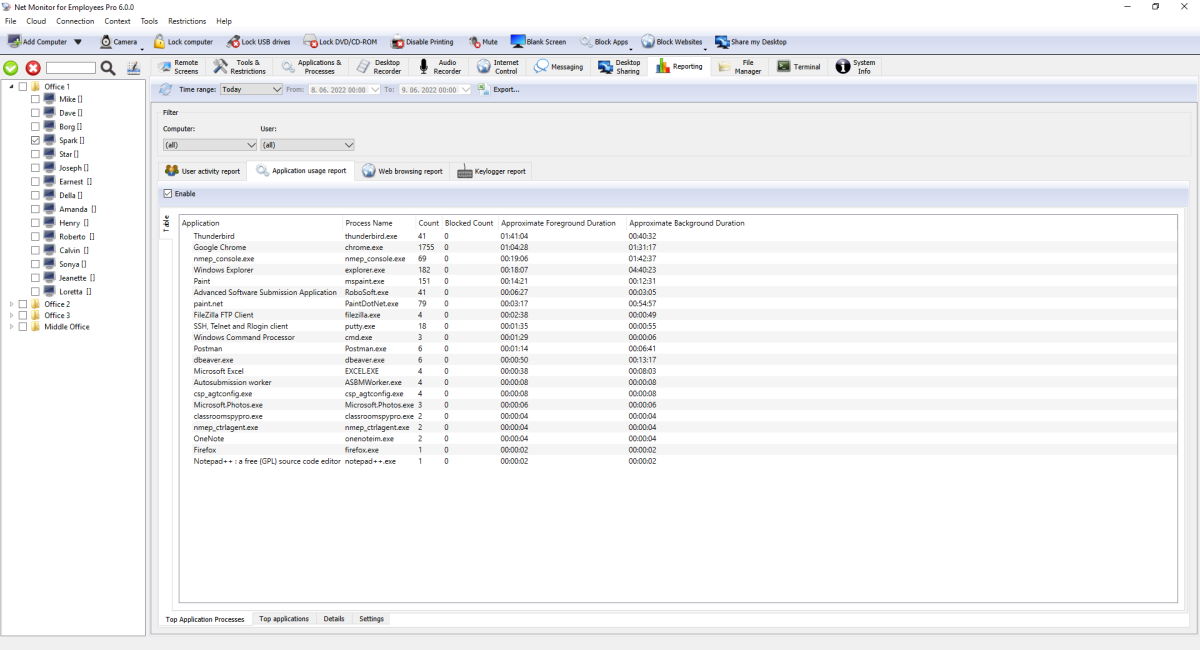
Toolbar and Global Filters
- Refresh loads new records and updates report totals.
Time range:presets include today/yesterday, week/month presets, last 7/14 days, and custom range.- Filter controls narrow results by computer and user (plus application where relevant).
- Export... saves current report output to file.
Reports
- User activity report: shows when the user was active or idle, plus logon/logoff timeline. Use this report to understand real working time for each employee.
- Application usage report: shows which applications and processes were used most. Use this report to see if employees spend time in approved work software.
- Web browsing report: shows visited websites and full URLs. Use this report to review work-related browsing and identify non-work browsing.
- Keylogger report: shows captured typed text and key sequences. Use this report when you need detailed activity evidence for investigations.
Loading and filtering reports
When you open Reporting, the Console loads its saved local records and requests new records from connected computers. Refresh downloads available records and recalculates reports. Enable logging before collecting data; activity that was never collected cannot be recreated. Each Console keeps its own local archive and synchronization progress. Agent retention determines how much history remains available to download.
Time range:, computer and user filters apply to summary totals, graphs, details and exports, together with the application filter where available. Recorded durations contribute only the part overlapping the selected range. Usage totals are estimates based on recorded activity events.
Tables, graphs and sorting
Table and Graph are available for Active/Idle Time, Top Application Processes, Top applications and Top websites. Metric: selects an available duration or count measure. Bars show the largest selected totals first, and full legend texts wrap. Details, Logon/Logoff and Keylogger report use tables.
Application, website, user activity and Logon/Logoff details start with the newest Time first. Click Time to reverse the direction. Keylogger report initially shows the newest Last changed first; click Time or Last changed to change the date column and direction.
Exporting report data
With Table selected, click Export... and choose CSV (Comma delimited), CSV (Semicolon delimited), Tab Delimited or Microsoft Excel (.xlsx). The export contains column headers and all matching rows, including rows beyond those currently loaded on screen, and preserves the selected detail-date order. Delimited text supports quoted fields and line breaks. Large Excel exports use multiple worksheets with repeated headers.
With Graph selected, Export... creates an Excel (.xlsx) workbook containing the currently selected metric as an editable chart and its numeric data, full labels and durations. Graph export is available when the graph has data.
If an export cannot be saved, the Console shows a warning and logs the error. A failed export leaves an existing destination file intact.
Settings In Each Report
- Enable turns logging on or off for that report type.
- Save configuration persists settings.
- Retention settings can remove old records on remote computers and in local console archive.
- External logger can send report events as JSON to another web address, with an optional header key and value.
External Logger JSON Examples
External logger sends JSON data to your configured URL using HTTP POST and Content-Type: application/json; charset=utf-8. If you set custom header key/value in the UI, that header is also sent. The examples below match the fields used by the application. Each payload also includes computer/session fields such as host, hwid, user, userfullname, ntdomain, terminal, session, ipv4, ipv6, pipv4, and pipv6.
User activity report event
{
  "time": "2026-04-29T08:45:10+02:00",
  "event": "Active",
  "duration": 300,
  "pid": 9152,
  "executable": "OUTLOOK.EXE",
  "name": "Microsoft Outlook",
  "caption": "Inbox - Outlook",
  "update": true,
  "host": "PC-01",
  "user": "j.smith",
  "session": 1
}
Application usage report event
{
  "time": "2026-04-29T09:10:00+02:00",
  "event": "InForeground",
  "pid": 14520,
  "executable": "excel.exe",
  "name": "Microsoft Excel",
  "caption": "Q2 Budget.xlsx - Excel",
  "class": "XLMAIN",
  "cmd": "\"C:\\Program Files\\Microsoft Office\\root\\Office16\\EXCEL.EXE\" \"C:\\Reports\\Q2 Budget.xlsx\"",
  "host": "PC-01",
  "user": "j.smith",
  "session": 1
}
Web browsing report event
{
  "time": "2026-04-29T09:22:14+02:00",
  "event": "Opened",
  "pid": 14520,
  "url": "https://portal.company.com/tickets/12345",
  "title": "Ticket #12345 - Company Portal",
  "browser": "chrome.exe",
  "host": "PC-01",
  "user": "j.smith",
  "session": 1
}
Keylogger report event
{
  "time": "2026-04-29T09:25:51+02:00",
  "pid": 9152,
  "name": "Microsoft Outlook",
  "executable": "OUTLOOK.EXE",
  "class": "rctrl_renwnd32",
  "caption": "New Message - Outlook",
  "keystrokes": "Hello team{{Return}}",
  "host": "PC-01",
  "user": "j.smith",
  "session": 1
}
Some fields are sent only in specific situations (for example duration on close/background events, or update on user-duration updates).
How Reporting Works
- Console downloads logs from connected remote computers into local report storage.
- Report totals and charts are updated from downloaded records.
- Status indicators show when data is loading, processing, or exporting.
Reporting FAQ
How do I export a report table or graph?
Open the required report and set its filters. In Table, click Export... and choose comma-delimited CSV, semicolon-delimited CSV, tab-delimited text or Microsoft Excel (.xlsx). In Graph, select Metric: and use Export... to save an Excel workbook with an editable chart and its data. Graph export requires data.
Why does a large Excel export have several worksheets?
The export includes all matching rows, rather than only the rows currently loaded on screen. Large data sets are split across worksheets as needed, with column headers repeated on each sheet. Check every worksheet for the complete report.
How do I show the most recent detail records first?
Application, website, user activity and Logon/Logoff details initially show the newest Time first. Click Time to change the direction. Keylogger report starts with the newest Last changed first; click Time or Last changed to change date sorting.
Why is a report empty or missing some records?
Check that logging was enabled on the monitored computer, that the computer is connected, and that the filters include the required records, then click Refresh. Retention may already have removed older records. A collection-unavailable notice can identify a report unsupported by the Agent. Check database-folder permissions for the account running the Console or Agent, and review logged database errors. Activity that was never collected cannot be recreated.
Do filters apply to Top reports and graphs?
Yes. The selected time range, computer and user filters, plus the application filter where available, apply to summary totals, graphs, details and exports. Duration totals include only the overlap with the selected range and are estimates based on recorded events.
Can several Consoles synchronize with the same Agent?
Yes. Each Console keeps its own local archive and synchronization progress. Connect each Console to the monitored computer and use Refresh to download available records. Agent retention limits the history still available to a Console that connects later.
Ready to start monitoring your employees?
Buy this application now. You will never regret your decision.
Buy Now