
Employee Audio Monitoring with Computer Audio Recorder
Audio Recorder can be used to capture remote computer microphone and speaker audio and to listen live when needed.
This feature allows managers to hear call and meeting context when screen activity alone is not enough.
Typical use cases include:
- Reviewing support or sales calls for quality checks.
- Checking if employees follow required call scripts.
- Investigating complaints where spoken conversation matters.
- Keeping audio proof from incidents for later review.
- Running scheduled recording during high-risk time periods.
Audio Recorder
Audio Recorder captures remote computer microphone/speaker audio, supports scheduled recording, and includes live listen mode for immediate supervision.
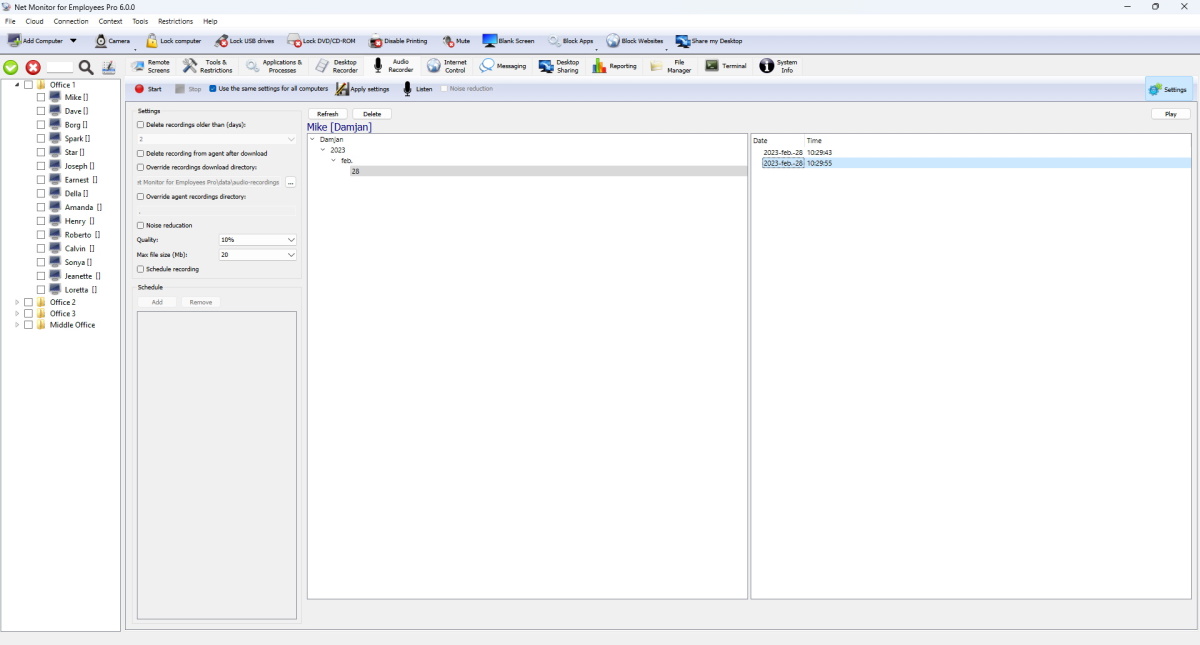
Toolbar Actions
- Start and Stop control recording on selected computers.
- Apply settings saves and sends current profile to remote computers.
- Use the same settings for all computers switches between shared policy and per-computer profile.
- Listen starts/stops live audio streaming (with source and noise-reduction options).
Recording Settings Explained
- Record microphone and Record speaker choose capture sources.
- Noise reduction improves clarity on noisy remote computers.
- Quality controls compression level.
- Max file size (Mb) rolls to a new file when threshold is reached.
- Schedule recording uses schedule tasks to start/stop automatically.
Storage and Download Pipeline
- Recordings are saved as .ogg audio files.
- Recording storage selects local agent storage or a named external storage profile.
- The console downloads local recordings through a bounded background queue and merges local and remote lists in one browser.
- Delete recording from agent after download keeps remote computer storage low.
- Override download location lets you choose where downloaded audio files are stored.
External and Cloud Storage
See External Storage Configuration for provider-specific fields, credential sources, required permissions, and setup steps.
Audio recordings can be uploaded directly by each agent to SMB 2/3, SMB 1.0, FTP, WebDAV, SFTP, Amazon S3 or compatible S3 storage, Google Cloud Storage, and Azure Blob Storage.
- Create named profiles under File / Configuration / External Storage and verify them with Test connection.
- Select the profile under Recording storage; files are organized as folder / agent host name / audio-recordings.
- Failed uploads remain pending on the agent and are retried automatically.
- Optional quotas can delete the oldest recordings or stop recording with an error. The recorder shows occupied recording space.
Security warning: SMB 1.0 and FTP are unsafe legacy protocols. Prefer SMB 2/3, SFTP, WebDAV over HTTPS, or an HTTPS object-storage endpoint.
End-to-End Encryption
Encrypt recordings protects local and external-storage audio. See End-to-End Recording Encryption for key backup, selected recordings, remote conversion, rotation, and recovery.
Use Decrypt all recordings... to stop encrypting new recordings and convert existing console and selected external-storage files in the background. Encrypted originals are removed only after verification; agent-only recordings must first be downloaded. To create unencrypted copies without changing stored originals, select recordings and click Save unencrypted....
Recordings Browser
- Left tree filters by user/date; right list shows recording timestamps.
- The first, unlabeled column shows a lock for encrypted recordings and a down arrow for recordings already downloaded to this console. The lock is always shown first.
- Select recordings and use Download to console, Encrypt, or Decrypt. Agent-only recordings must be downloaded before local encryption changes.
- List supports playback and file actions for selected records.
Ready to start monitoring your employees?
Buy this application now. You will never regret your decision.
Buy Now