
Employee Messaging Software for Remote Computer Alerts
Using the Monitoring Console
Messaging can be used to send messages or questions to selected users and collect responses.
This feature allows managers to make sure employees see important messages and confirm them when needed.
Typical use cases include:
- Sending urgent instructions to all selected computers.
- Requesting confirmation that employees read a policy update.
- Collecting quick status answers from remote employees.
- Sending shift-start reminders to distributed teams.
- Notifying users about planned downtime or maintenance windows.
Messaging
Messaging sends announcements or questions to selected computers and can collect user answers in real time.
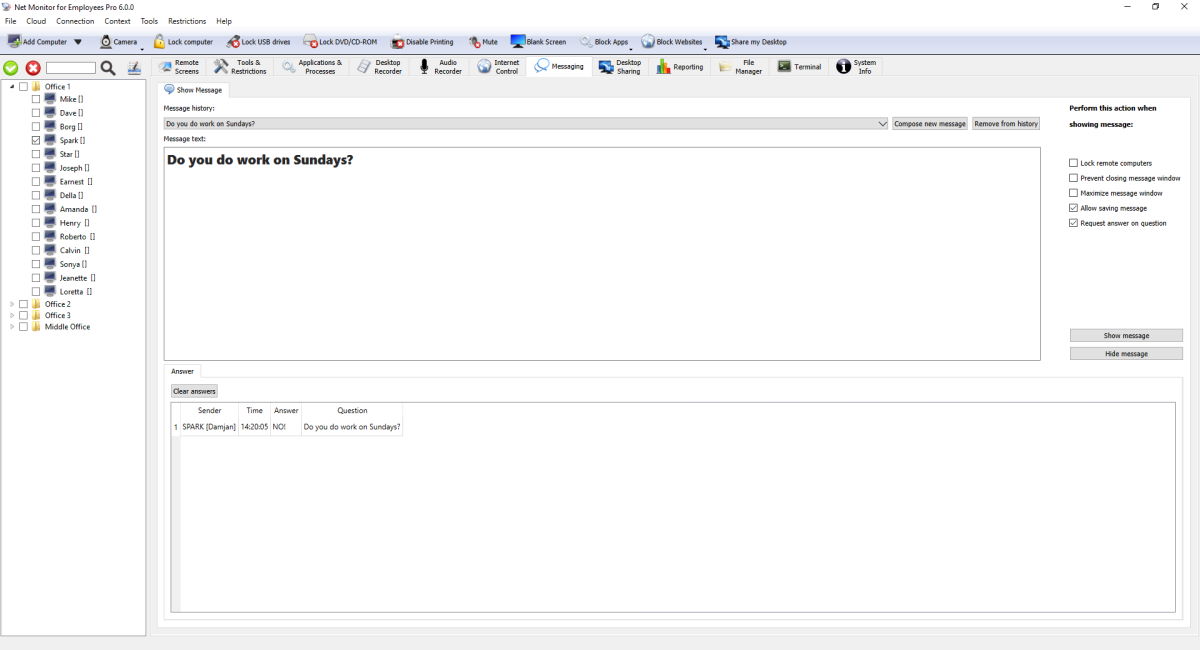
Compose and Reuse Messages
- Message history stores reusable templates.
- Compose new message starts a fresh draft.
- Remove from history deletes selected template.
- Message text supports formatted content.
Show Message Options
- Lock remote computers blocks workstation input while message is visible.
- Prevent closing message window keeps message on screen until admin hides it.
- Maximize message window shows message fullscreen.
- Allow saving message enables remote computer copy/save actions.
- Request answer on question shows answer field and sends answers back to console.
Show / Hide Workflow
- Prepare message text and options.
- Click Show message to display on selected remote computers.
- Click Hide message to close active message windows remotely.
Answers Tab
- Answers table shows sender, time, answer text, and related question.
- If answer is required, remote computer user is prompted until answer is submitted.
- Clear answers removes collected answers from current console view.
Ready to start monitoring your employees?
Buy this application now. You will never regret your decision.
Buy Now