Application usage monitoring / Practical guide
Application Usage Monitoring Software: Report Guide
Read application usage reports to distinguish open processes, active use, and idle time. Review software adoption with examples and clear limits on interpretation.
A timesheet cannot tell you whether an employee spent three hours in a business application, switched constantly between social media and streaming, or installed an unapproved remote-access tool. Application usage monitoring software gives managers and IT teams the operational evidence that time-based reporting misses.
For a small or midsize business, that evidence has immediate value. It can expose recurring productivity losses, identify software that creates security exposure, show where workflows stall, and support a fair conversation when performance is in question. The goal is not to collect data for its own sake. The goal is to know what is happening on company devices and act before small problems become lost revenue, security incidents, or policy disputes.
01What does application usage monitoring software track?
Application usage monitoring software records which programs people use on company computers and provides activity reports for review. Depending on the configured features, those reports can be combined with live screen viewing, desktop recording, and application controls. Managers use the evidence to investigate workflow delays and policy risks, while IT uses it to identify unapproved tools and respond.
Useful monitoring goes beyond a simple list of programs opened during the day. Managers need to see which applications were used, how long they were active, when they were used, and whether the activity occurred during scheduled work time. IT administrators need deeper context: running processes, browser activity, and signs that a user is trying to bypass company controls. Where the risk warrants it, combine these records with file audit evidence and device controls from the systems configured in your environment.
Application activity reports should be filterable by employee, computer, date range, or application name. Review the relevant users and computers together when assessing a department. Without filtering, a large volume of raw event data creates more work than it saves. With filtering, an operations manager can review a sales team's CRM usage for a particular week, while IT can investigate whether a prohibited application appeared on any endpoint.
Screen viewing and desktop recording add the context that application names cannot provide. An application may be open for several hours while the employee is inactive, working in another window, or using it for a task outside their assigned role. Live screen visibility and recorded desktop activity help establish what actually happened, not merely what process was running.
Application time, idle time, and completed work are different measures
A running process is not the same as an application in the foreground, and foreground time is not proof of productive work. Read application usage alongside user activity, the assigned task, and the employee’s results. A long design session may be expected; a short visit to an unapproved remote-access tool may deserve closer review. This distinction keeps employee application tracking useful without turning every minute into a performance score.
Worked weekly application review
These invented figures illustrate interpretation, not product benchmarks. Compare equivalent users, dates, report definitions, and collection coverage before drawing a conclusion.
- CRM: 12 reported hours this week versus 8 last week. More time may reflect adoption, training, or a slow workflow. Check completed customer updates and the employee's explanation.
- Background sync helper: visible in a process list throughout a shift. Process presence is not eight hours of active application use; identify the publisher and parent application before grouping it.
- Design app: 6 reported hours under two executable names after an update. Verify both names belong to the same approved product before combining them; avoid double-counting overlapping records.
Record the source, filter, definition of time, known gaps, task outcome, and next question. Recheck adoption after an agreed training or workflow change; do not convert app time into a productivity score.
02Turn application usage reports into endpoint control
When a report identifies an unwanted tool, follow the application installation and execution guide. Keep usage records, installed-software inventories, and blocked-launch events separate: each answers a different question.
Consider an employee who installs an unapproved remote desktop application. A usage report may reveal that the application ran, although that alone does not prove when or how it was installed. A more complete system allows IT to investigate the available screen and process records, block the application, transfer required files if needed, and document the response. If removal is necessary, use your approved remote administration procedure. That is a materially different outcome from sending an email and hoping the software is removed.
03A practical application monitoring workflow for managers and IT
The best application usage monitoring software fits into a repeatable routine rather than demanding constant surveillance. Managers do not need to watch every screen all day. They need exceptions, evidence, and a way to verify performance when a metric or deadline raises questions.
A department manager might begin with a weekly report of the most-used applications, inactive periods, and non-business websites. If one employee's results differ sharply from the team pattern, the manager can review the relevant time period in more detail. This can reveal a legitimate explanation, such as training, research, a customer support issue, or a business application that was not categorized correctly. It can also reveal avoidable distractions or a lack of engagement that requires intervention.
IT teams use the same data differently. They may review newly detected processes, software that falls outside the approved application list, or suspicious browser activity, then correlate those findings with file-transfer evidence from other audit sources where available. Combining application and process records with screen recordings produces an evidentiary record that is more useful than a vague alert. It helps administrators determine whether the event was an accident, a policy violation, or a potential insider-risk incident.
For hybrid and remote teams, off-network visibility matters. A laptop does not stop being a company asset when it leaves the office. A configured Cloud connection allows administrators to monitor remote endpoints over the Internet when they are connected, including while users work from home, travel, or visit customer sites. Plan activity-report retention and recording storage separately so the records your team needs remain available for review.
In Net Monitor for Employees Pro, monitoring over the Internet requires a Cloud account and the relevant subscription-based Cloud license. Use the remote monitoring setup instructions to configure access, then test the reports and retention settings your team plans to rely on.
04Application usage monitoring features to evaluate
Evaluate report quality by checking the user and computer filters, time-range boundaries, application naming, export readability, and missing coverage. Reproduce one harmless application session and compare the report with your notes. Use evidence-handling procedures when a review becomes an investigation; a long list of unrelated remote controls does not establish reporting accuracy.
05Set clear rules for employee application monitoring
Employee monitoring works best when it is backed by written policy, consistent enforcement, and a legitimate business purpose. Company-owned devices should have clear acceptable-use rules that explain what activity may be monitored, what software is prohibited, how business data must be handled, and what happens when employees violate policy.
Requirements vary by state, industry, union agreement, and the type of communications being monitored. Obtain appropriate legal guidance before deployment, particularly when monitoring remote workers, recording audio, or operating across multiple states. Transparency and proper notice can reduce disputes while helping the company protect its systems, data, and paid work time in a way that respects applicable obligations and workers' rights.
For UK workplaces, the ICO’s worker-monitoring guidance covers purpose, transparency, proportionality, and retention. Check the requirements for the locations where your employees work rather than assuming that one policy fits every jurisdiction.
Policy should also define access to monitoring records. Not every manager needs access to every recording or keystroke log. Limit administrative privileges to people with a defined operational or security need, and document who is permitted to view, export, alter, or delete collected data. Strong oversight protects employees from misuse and protects the business from internal control failures.
06How to start monitoring application usage
Do not deploy application monitoring with a vague plan to "improve visibility." Start with the specific situations costing the business time or creating exposure. That could be unapproved software, recurring missed deadlines, unexplained inactivity among remote staff, risky browser behavior, or repeated attempts to bypass device policy.
Configure reports around those concerns first. Establish a normal baseline for each role, then investigate meaningful deviations rather than treating every variation as misconduct. A graphic designer, support agent, accountant, and field coordinator will use different applications and follow different work patterns. Context prevents wasted management time and makes enforcement more defensible.
Test application reports and controls on a small group
Use a limited group of authorized company devices to confirm the workflow before rolling it out across a department. The Reporting help explains the report controls and retention settings.
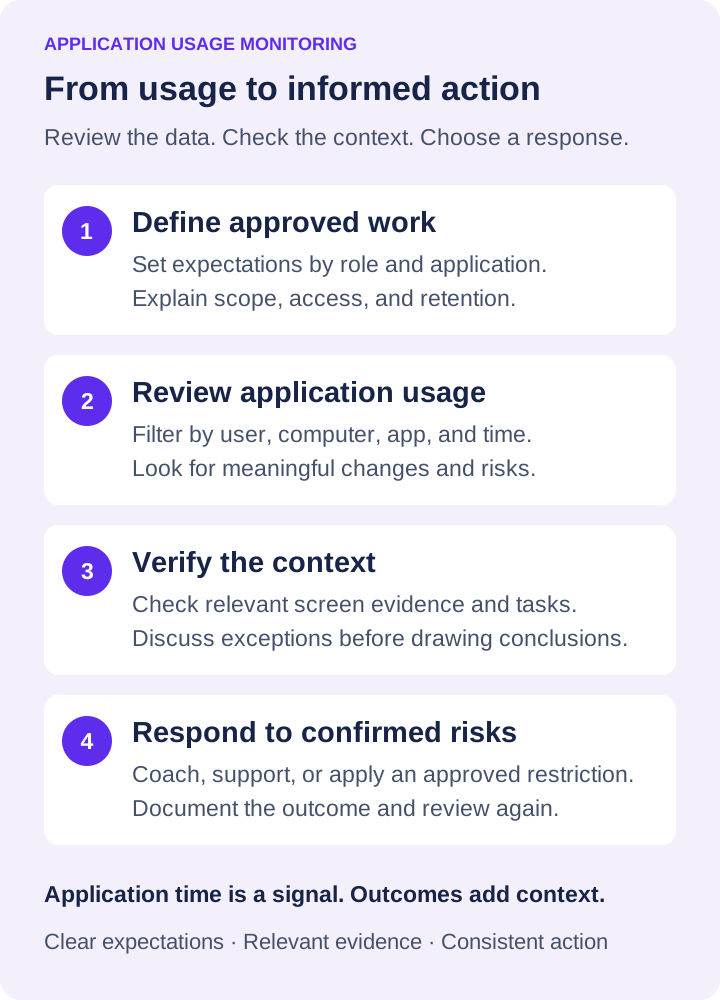
- Enable the relevant reports. In Reporting, configure the Application usage report and the user activity report. Use Enable and Save configuration for the data you intend to collect.
- Choose a useful review period. Set Time range and filter by computer, user, and application where available. Compare equivalent roles and working periods.
- Verify the context. Review permitted screen evidence and discuss unexpected patterns before deciding that activity represents a policy breach or lost productivity.
- Test a defined response. On a test device, validate your application allow or block rules, check legitimate work still functions, and document exceptions and reviewer access.
Net Monitor for Employees Pro combines activity monitoring with the remote controls administrators need to respond quickly. A fully functional free trial lets you test reporting, recording, blocking, and endpoint controls on your own systems before committing to licenses.
The useful question is not whether employees ever use a non-business application. It is whether their activity creates a measurable productivity loss, violates policy, exposes company data, or prevents the organization from meeting its obligations. When you can answer that question with clear records and take corrective action from the same console, oversight becomes a practical part of running the business.
07Application usage monitoring: common questions
Does application usage monitoring measure employee productivity?
It provides evidence about application use, timing, and work patterns. It does not establish output quality or completed work by itself. Compare reports with role expectations, deliverables, and the context behind unusual activity before making a performance decision.
Can you monitor application usage on remote employee computers?
Yes, with a supported endpoint and a configured remote connection. In Net Monitor for Employees Pro, Internet monitoring uses a Cloud account and a subscription-based Cloud license. Test connectivity, report collection, access permissions, and retention on your own devices before expanding the deployment.
Can application monitoring help block unauthorized software?
Reports help identify tools that need investigation. Net Monitor for Employees Pro also provides application and process controls, including closing selected tasks and configuring application allow or block lists. Confirm the business purpose of an application before restricting it, and use an approved administration procedure if it must be uninstalled.