Keystroke logging / Practical guide
Keystroke Logging for Employees: Uses and Evidence Limits
Understand when keystroke logging for employees adds useful context, what typed input cannot prove, and how to verify a record against independent evidence.

Keystroke logging for employees can add detail when an investigation depends on typed input, such as a disputed command or repeated data-entry error. It is a sensitive evidence source, not a productivity score. Define the question first and decide whether less intrusive application or screen records can answer it.
Used properly, keystroke records can show what was typed, when it was typed, and on which company computer. That level of detail is valuable for investigating security incidents, verifying policy compliance, resolving disputes, and identifying workflow problems that cost time. It is not a replacement for management. It is a control that gives management facts before problems become expensive.
01What keystroke records can and cannot establish
Keystroke logging captures keyboard input on monitored endpoints. Depending on the monitoring configuration, administrators can review typed text alongside the active application, website, user account, date, and time. When paired with screen recording or live screen viewing, the record provides context that a standalone log cannot.
A log may show text entered into an application, but typed text is not proof that it was submitted, saved, or executed. Pasted content, autofill, and other input methods may not produce the same record as individual keystrokes. Verify the configured capture behavior and use the application's own audit trail to confirm the outcome.
The same applies to operational oversight. A manager may see that a task took three hours. The log and related desktop recording can reveal whether the delay came from repeated data-entry errors, an unfamiliar process, a system issue, or non-work activity. This helps leaders correct the actual cause instead of making assumptions.
Example: a disputed customer-reference correction
In this fictional case, a reviewer sees a replacement reference number in a keyboard record. Check each state independently before attributing a completed change.
- Typed: the record contains the digits. Confirm the application, device, time, and capture limitations.
- Submitted: a permitted screen record may show a save action; the typed digits alone do not establish it.
- Saved or executed: consult the business application's audit event and resulting record. A validation error, canceled form, or failed request can change the outcome.
Pasting, autofill, and input methods may produce different evidence. Preserve contradictions and ask the employee to explain the task; never infer the final business record solely from typed text.
02When keystroke logging for employees is justified
Not every role requires the same level of monitoring. Keystroke logging for employees is most useful where company-owned computers handle customer information, financial data, intellectual property, regulated records, administrative credentials, or high-volume transaction processing.
Working remotely is not, by itself, a reason to collect every keystroke. Define a specific authorized investigation, limit its scope and reviewers, and check the applicable requirements before enabling capture. Use activity reports when timing or application use is enough; detailed text collection should answer a question those records cannot resolve.
Common use cases include investigating suspected data exfiltration, confirming unauthorized account access, reviewing changes made in critical business systems, documenting repeated policy violations, and auditing data-entry work where errors have financial or compliance consequences. In these situations, vague activity summaries are often insufficient.
Keystroke logs are also useful after an incident. If a user reports that malware appeared after opening an attachment or that a customer record was changed without authorization, IT needs more than recollection. A time-stamped activity record can narrow the investigation quickly, identify affected systems, and support a defensible response.
03Pair logs with screen and application evidence
A keystroke log without context can be misleading. Employees may type a customer number, a password hint, a search phrase, or draft text that looks questionable when separated from the task on screen. Administrators should review logs alongside application usage, website history, process activity, and desktop recordings before reaching a conclusion.
This is where an all-in-one monitoring system has an operational advantage. Rather than exporting data from separate tools, IT can investigate from a single administrative view. A supervisor can identify an unusual period in an activity report, open the corresponding screen recording, check the applications in use, and review keyboard activity only where it is relevant.
That approach reduces noise. It also keeps managers from treating monitoring as a substitute for judgment. The goal is not to create more data. The goal is to produce usable evidence for a specific management, security, or compliance decision.
04Set rules before turning logging on
The strongest employee monitoring program is clear before it becomes necessary. Publish an acceptable-use policy that explains that company devices and company accounts may be monitored, what categories of activity may be recorded, and why the company uses those records. Employees should understand that monitoring supports productivity, security, and protection of business assets.
Work with legal counsel on the rules that apply to your locations, workforce, and industry. Federal, state, and local requirements can differ, particularly for recording communications, handling personal information, and monitoring employees who work across state lines. Customer contracts and industry obligations may create additional limits.
Define access controls as well. Keystroke data can contain sensitive material, including customer details and information typed into business applications. Limit access to authorized managers, HR personnel, and IT or security staff with a legitimate need to investigate. Keep an audit trail of administrative access and avoid sharing raw logs casually.
Retention deserves the same discipline. Retaining records forever increases storage costs and exposure. Retaining them for too little time can leave the business without evidence after a complaint, audit, or incident. Set retention periods based on risk, legal advice, internal policy, and storage capacity, then apply them consistently.
05Use monitoring to act, not merely watch
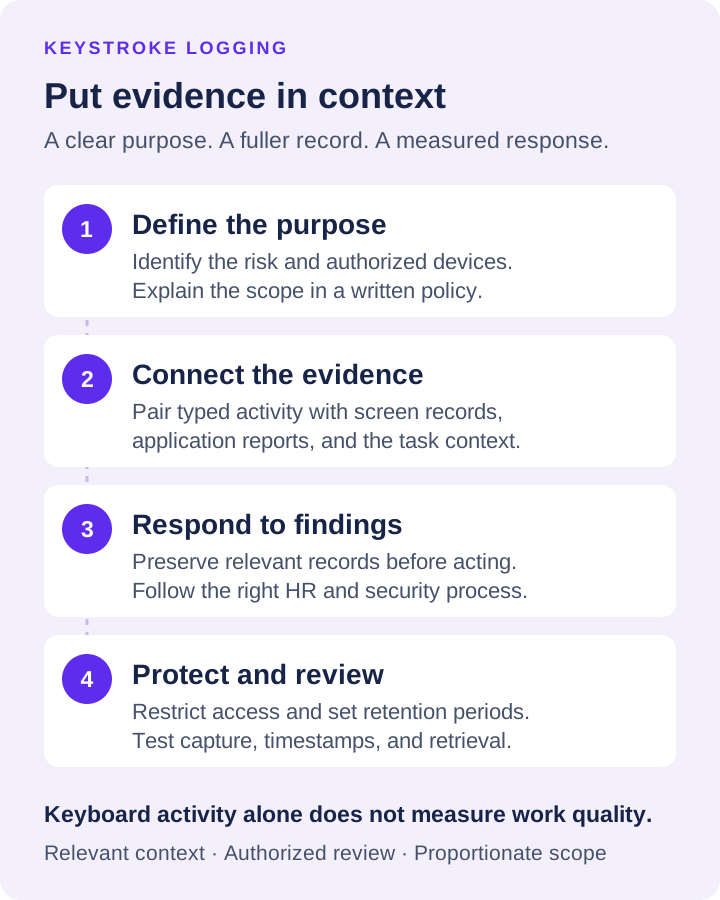
Use a defined monitoring policy to authorize and limit sensitive input review. For a disputed event, document observations and findings separately instead of treating a keyboard log as a complete investigation.
06Avoid the mistakes that create risk
Overcollection is the most common mistake. Logging every endpoint at maximum detail without a purpose creates a large volume of sensitive data that few people will review. Start with the devices, departments, and risk scenarios that matter most. Expand only when the business case is clear.
The second mistake is using logs as a shortcut to performance management. Keystrokes do not measure the quality of customer conversations, the difficulty of a technical problem, or the value of strategic work. Use them to validate facts and find exceptions, then assess performance through the standards appropriate to the role.
The third mistake is ignoring personal-use boundaries. Company computers should have clear rules, but employees may occasionally access personal accounts or type sensitive information. Strong policy language, targeted review practices, role-based permissions, and reasonable retention controls help reduce unnecessary exposure.
Finally, do not wait for an incident to test your process. Verify that records are being captured correctly, clocks are synchronized, administrators can find the right device and time period, and access to reports is restricted. A monitoring system that is difficult to operate during a crisis will not deliver the protection you expected.
A disciplined keystroke logging program gives your business a clearer record of what happens on company devices. Configure it around real risks, protect the data it collects, and use the evidence to make faster, firmer decisions when productivity, security, or accountability is on the line.