Website usage tracking / Practical guide
Website Usage Tracking for Employees That Works
Review URLs, visit patterns, and job context, then test website rules against the services employees actually need.

Website usage tracking for employees helps distinguish customer research, browser-based work, and repeated access to unapproved services. Start with the URL, user, computer, and review period. A browser can host an entire working day, so a domain name or long visit alone cannot tell you whether that time was productive.
For small and midsize businesses, this is not about watching every click for its own sake. It is about protecting paid time, confidential data, network security, and management's ability to act when a problem appears. The right system shows which websites were used, by whom, for how long, and on which computer. It should also help administrators restrict access, investigate incidents, and document policy violations without assembling evidence from several disconnected tools.
01Read website usage records at URL level
A useful web activity log must do more than produce a broad category such as "social media" or "news." Managers need details they can evaluate against a job role, a work schedule, and a written acceptable-use policy.
At a minimum, tracking should record the employee or device name, visited website or URL, visit time, duration, and frequency. This creates a timeline that can answer practical questions. Was an employee accessing a personal webmail account before sensitive files were copied? Is a team spending substantial work time on nonbusiness websites? Did a user visit a known phishing page before a malware alert?
Context matters. A marketing employee may have a legitimate reason to use social networks, video platforms, and competitor websites. A payroll clerk may need access to banking portals and benefits providers. The goal is not to treat every nonstandard site as misconduct. It is to identify activity that does not match the role, creates a security exposure, or repeatedly consumes paid work time.
Website data becomes much more useful when it is paired with application, process, and screen activity. A URL log may show a user visited a file-sharing site. A screen recording and application report can help establish whether the visit involved legitimate research, unauthorized uploads, or an attempt to move company data outside approved systems.
02Why Browser History Is Not a Management Tool
Browser history is incomplete, easy to clear, and limited to one local device and browser profile. It does not give managers centralized reporting, consistent retention, live visibility, or a reliable chain of evidence. It also does not tell an IT administrator what happens when an employee uses private browsing, switches browsers, or works remotely outside the office network.
Network-only logs have limits too. They can show domains contacted through the network, but may not clearly connect activity to the person using the computer. They can also miss useful desktop context, especially for remote employees working from home, traveling, or using different connections.
Endpoint website reports add user and computer context to browsing records. Verify coverage in the browsers and configurations your business uses, including private-browsing modes where relevant. Do not assume every browser behaves identically. Correlate suspicious visits with permitted screen evidence and separate audit sources; a URL record does not prove a file upload.
03Turn Website Logs Into Action
Collecting web data without a review process creates another administrative burden. The system should help managers filter records by employee, computer, date range, website, application, or activity type. Instead of scrolling through days of data, an administrator should be able to isolate a pattern in minutes.
Start with exceptions, not constant surveillance. Review excessive time on nonbusiness domains, visits to blocked or high-risk categories, repeated attempts to bypass restrictions, and activity that conflicts with an employee's assigned work. This focuses attention where it is needed and reduces unnecessary review of staff who are meeting expectations.
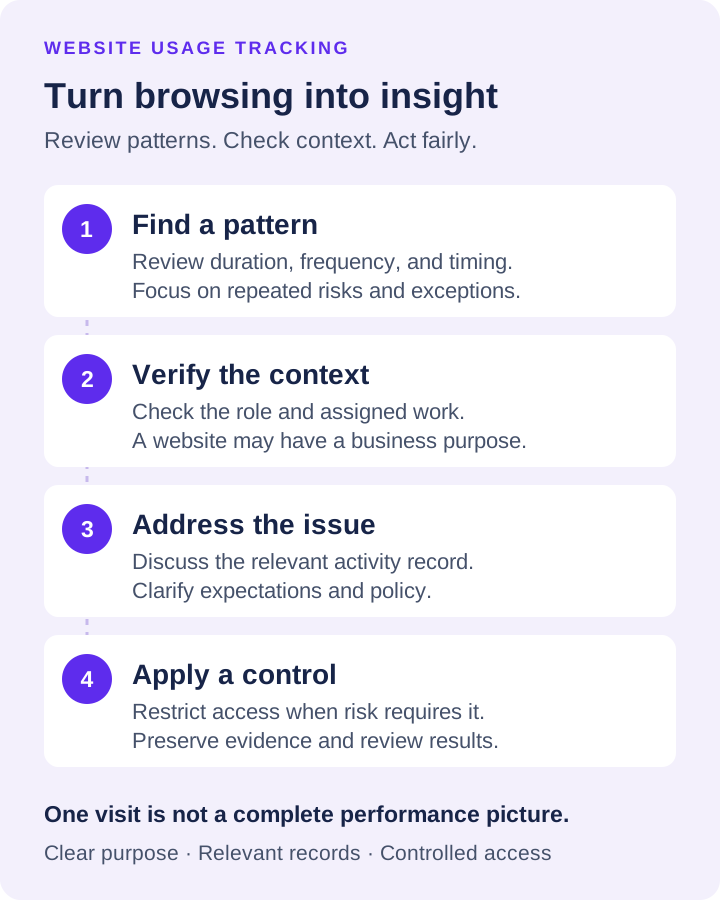
A practical response usually follows three stages. First, verify the context. A site that looks unrelated may be part of a legitimate vendor, customer, or research task. Second, address the issue with the employee or department manager using the activity record, not a vague accusation. Third, apply a control if the behavior continues or the site presents an immediate risk.
Controls can range from a policy reminder to website blocking, application restrictions, device controls, or closer review of recorded activity. For a serious insider-risk concern, IT may need to preserve screenshots, desktop recordings, website logs, and related file activity before changing access. Preserving evidence first protects the investigation and prevents a user from claiming the decision was based on guesswork.
04Block Risky and Distracting Websites Before They Cost You
Reporting shows what happened. Blocking helps prevent it from happening again. That distinction matters when managers are dealing with websites that create a direct operational or security risk.
Organizations commonly restrict gambling, adult content, unauthorized cloud storage, personal webmail, streaming services, proxy sites, cryptocurrency services, and known malicious domains. The exact list depends on the business. A design agency may permit video platforms for production research, while a call center may restrict them during shifts to preserve bandwidth and attention.
In Net Monitor for Employees Pro, Internet Control uses URL or keyword allow and block rules. Translate your policy into tested lists rather than assuming automatic category classification. Check sign-in pages, redirects, and supplier portals on a pilot computer, and document approved exceptions before applying rules more widely.
Blocking is also a security control. Unauthorized file-sharing and personal email services can become paths for data exfiltration. Proxy and anonymizer sites can be used to evade policy controls. When a device accesses websites with no approved business purpose, the organization is accepting risk without gaining operational value.
05Use Monitoring Carefully and Defensibly
Employee monitoring has legal, privacy, labor, and workplace-culture considerations. Requirements vary by state, employee location, union status, industry, and whether devices are company-owned or personally owned. Organizations should establish a written monitoring and acceptable-use policy, provide notice where required, and consult qualified legal counsel on their specific obligations.
The clearest boundary is usually company-owned equipment used for work. Employees should know that work systems, internet access, and company data are subject to monitoring and security controls. Remote work does not remove the employer's need to protect customer records or paid work time, but it does make policy clarity more important.
Avoid collecting more than you need for the stated business purpose. Set retention periods for logs and recordings. Limit access to authorized managers, IT personnel, HR, and security staff. Use filtering so a supervisor reviewing a productivity issue sees relevant activity rather than unrestricted personal information.
These safeguards do not weaken oversight. They make it more defensible. A documented policy, consistent enforcement, and controlled access demonstrate that monitoring is a business process tied to productivity, security, and accountability rather than arbitrary intrusion.
06A Practical Setup for Distributed Teams
For office and remote endpoints, begin by identifying the computers that handle sensitive data, customer communication, financial work, or work that is difficult to measure by output alone. Install monitoring on authorized company devices and organize endpoints by department, location, or manager.
Configure website logging alongside application and process tracking. Set reports to show trends over a defined period, then create targeted filters for high-risk domains, repeated policy violations, or unusually high nonproductive browsing time. If a manager needs immediate confirmation, live screen viewing provides a faster answer than waiting for end-of-week reports.
Recording settings should fit the risk level and available storage. Some organizations need periodic screenshots for routine accountability. Others require continuous desktop and audio recording for regulated workflows, investigations, or high-risk roles. Storage should be secured and managed centrally, whether records are kept on local infrastructure or approved cloud-compatible storage.
Net Monitor for Employees Pro combines live screen viewing, website and application logs, desktop recording, reporting, remote controls, and website blocking in one administrator-focused system. That combination matters when a manager identifies a problem and IT needs to verify it, preserve evidence, restrict access, or remotely manage the affected endpoint without changing tools.
07Measure the Pattern, Not a Single Visit
One visit to a nonbusiness website is rarely a useful performance measure. Repeated patterns are. Look for duration, frequency, timing, and whether the activity occurs during missed deadlines, customer delays, security events, or periods when an employee reports being overloaded.
The same principle applies to top performers. Website tracking can expose workflow obstacles, slow internal systems, unnecessary research tasks, and tools that force employees to search for workarounds. Used correctly, the data helps managers distinguish poor performance from poor process.
Start with a clear policy, monitor authorized devices consistently, and review exceptions with context. Then use the evidence to correct behavior, block avoidable risk, and protect the work your business is paying for. A free trial on a controlled group of company computers can show quickly where visibility is missing and which controls will make an immediate difference.