Policy violation evidence / Practical guide
Policy Violation Evidence Example: Document an Incident
See how to document a suspected unauthorized file transfer with a factual timeline, an evidence register, and the employee’s explanation. Preserve the source records and distinguish observations from findings.

An administrator sees a company laptop open a personal-storage website while a customer folder is selected. The employee says the transfer was approved. A useful policy violation evidence example connects that concern to the applicable rule, source records, and authorization checks without assuming that a completed breach occurred.
For small and midsize businesses, this distinction matters. A vague accusation creates conflict, wastes management time, and can lead to unfair treatment. A dated activity record, paired with the relevant policy and a documented review, gives management a factual starting point. The investigation must still consider missing information, authorization, and the employee’s explanation before reaching a finding.
What is a useful policy violation evidence example?
A useful case file connects the observed event to a device or account, a time period, the applicable rule, and preserved sources. Include contradictory evidence, the employee's explanation, and unresolved questions. A reviewable record supports a reasoned decision; it does not guarantee a legal outcome.
01What makes policy violation evidence reliable?
Evidence is not simply a screenshot of something questionable. It is a record that connects an observed action to a specific business rule and preserves enough context for a manager, HR reviewer, or IT administrator to understand the event. An allegation describes a concern; evidence provides the material used to test it.
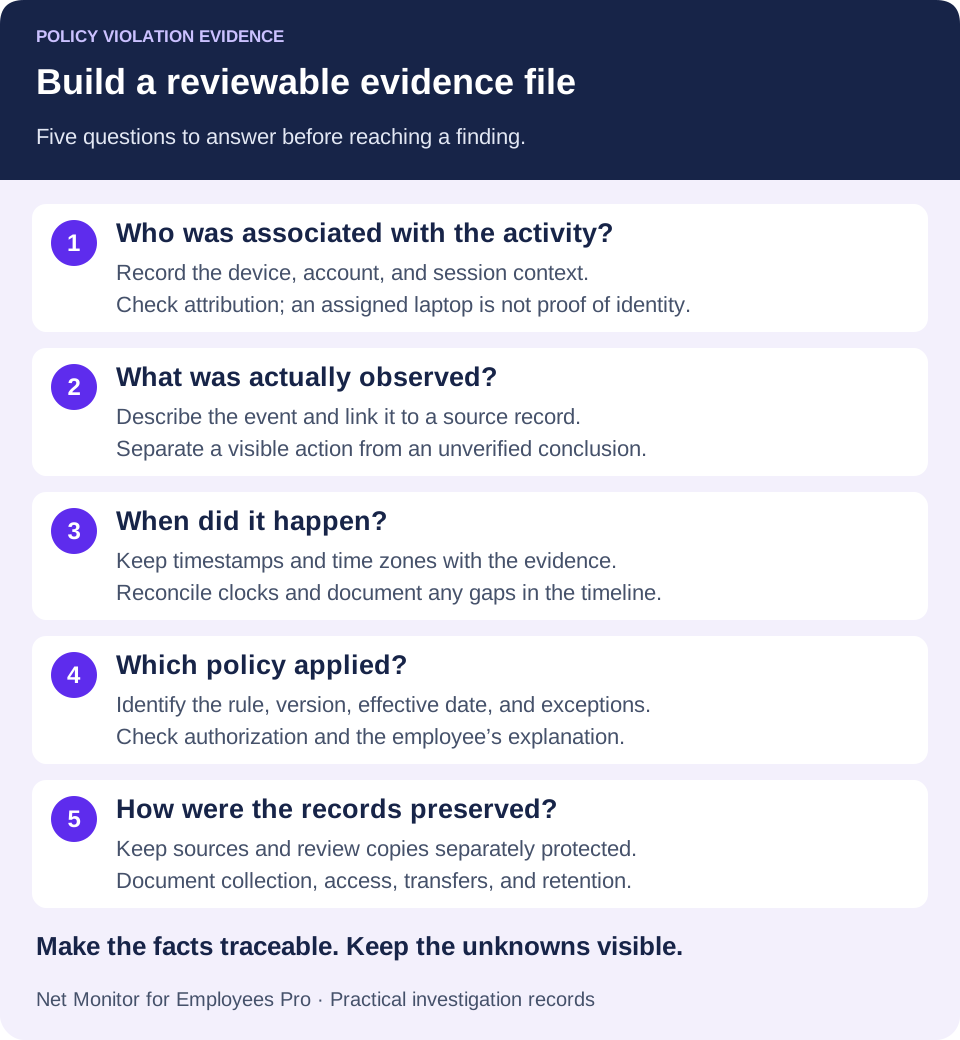
A useful evidence file addresses five questions: who was associated with the device or account, what was observed, when it occurred, which policy applied, and how the record was preserved. If attribution or timing is uncertain, state that uncertainty. A missing detail does not always make evidence useless, but it can limit the finding that the record supports.
For example, a screenshot showing a prohibited website is weaker without a device name, user context, timestamp, or surrounding activity. It may show an open page, but not who opened it, how long someone attended to it, or whether its use affected work. A filtered website activity report and a relevant screen-recording segment add context. They still need interpretation: an open tab is not proof of intent or a completed file transfer.
Match the review to the risk. A minor productivity concern may call for a report review and a conversation. Suspected data theft, harassment, unauthorized access, or a serious compliance issue may require specialist preservation, tighter access, and involvement from HR, security leadership, or legal counsel. Use the organization’s investigation procedure and the requirements that apply to the situation.
02Policy violation evidence example: a suspected unauthorized file transfer
Consider this fictional training example. Company policy prohibits transferring customer lists, financial records, or internal project files to personal storage without written authorization. A sales employee is preparing to leave the company, and IT notices unusual activity on the assigned company laptop. The departure provides context for an access review, but it is not evidence of misconduct.
The evidence package should not begin with “Employee stole files.” That is a conclusion requiring support. Start with the concern, then document the available records in a clear sequence. Give each item an evidence ID so the reviewer can trace a statement back to its source.
| Evidence item | What it can establish | What still needs checking |
|---|---|---|
| E01 · Policy and acknowledgment | The policy version in force and the record that it was communicated to the employee. | The relevant clause, effective date, approved exceptions, and whether the conduct falls within that rule. |
| E02 · Endpoint activity report | Access to a storage website or application in the recorded device and user context, at the times shown. | Account attribution, shared or remote sessions, time zone, and gaps in collection. A visit alone does not prove upload. |
| E03 · Screen recording or screenshots | The visible sequence, such as folder selection, an upload dialog, and any displayed progress or completion message. | Whether the recording covers the whole action. File selection or a progress indicator alone does not prove successful delivery. |
| E04 · File and folder details | Relevant names, paths, versions, timestamps, and the business sensitivity established from authorized sources. | Which files were actually involved. A folder name does not establish every file’s content or the scope of exposure. |
| E05 · Service, access, or security records | Available destination-account events, transfer results, and session details from the relevant system. | Whether the log records a completed upload, merely a connection, or something else; also reconcile its clock and coverage. |
| E06 · Investigation and handling notes | Who collected and reviewed each item, when and how it was preserved, and what explanations were considered. | Unresolved questions, the authority for access, the employee’s response, and the basis for the final finding. |
A factual incident-summary example
The initial note below deliberately describes a possible breach. All names, identifiers, and dates are illustrative. For this example, the reviewer has reconciled the relevant timestamps to UTC and recorded that check in the case file.
“On 8 May 2026, between 16:06 and 16:18 UTC, activity report E02 records access to a cloud-storage website in the signed-in user context of laptop SALES-17. Recording E03 shows selection of the folder ‘2026 Renewal Pipeline’ and an upload progress indicator. The available recording does not establish final delivery or ownership of the destination account. Policy E01, acknowledged on 4 January 2026, prohibits unapproved transfers of customer and internal business data to personal accounts. The reviewer is checking destination-service records, account attribution, and any written authorization. No finding about motive or a completed unauthorized transfer has been made.”
This statement is specific, factual, and reviewable. It describes the visible activity without assuming intent. If an authorized service record later confirms a completed upload, add its evidence ID and the exact finding it supports. If the employee produces valid written approval, document and verify it. If material facts remain unavailable, record the limitation rather than converting suspicion into certainty. A finding should follow the completed review, not precede it.
Document both the explanation and the outcome
Record the employee’s response accurately, including disputed facts and any supporting messages or approvals. Then explain which points were corroborated, contradicted, or left unresolved. A reviewer might conclude that an authorized transfer occurred, that a particular policy clause was breached, or that the evidence is insufficient to determine what happened. The organization’s authorized decision-maker determines any further action under its procedure; the activity report does not make that decision.
03Preserve relevant records and plan the review
A common mistake is to react to one suspicious event before planning how to preserve and assess the evidence. Local files, browser history, sessions, and recordings can change or expire. Preserve relevant material promptly through the established investigation process. The investigator should decide how and when to notify the employee, considering applicable procedure and any specific risk to evidence or witnesses. Do not assume every employee will alter evidence or use preservation as a reason to delay a fair response indefinitely.
For a jurisdiction-specific reference, Acas’s UK guidance on preparing an investigation recommends planning the sources, timing, and responsibilities. It also addresses informing the worker and circumstances where evidence or witnesses may be at risk. Apply the requirements relevant to your workforce.
Start by identifying the time window. One event may point to a broader pattern, but collecting weeks of unrelated activity increases privacy exposure and slows review. Focus on the period before and after the event, then expand only when the evidence supports doing so. Record any gaps caused by a device being offline, logging being disabled, or retention cleanup.
Preserve original records in their native form where possible. Keep timestamps, device identifiers, report filters, and recording metadata intact. Produce working copies for review and restrict access to the preserved source. Record who collected, transferred, or accessed each item, when, and why. Keep cropped, redacted, annotated, or converted versions clearly separate so an edited screenshot does not become the only record.
Keep an evidence-handling log
At collection, assign an item ID and record its source system, collector, collection time and time zone, original filename or reference, collection method, and storage location. Log subsequent handoffs and transformations. Where your evidence process uses file hashes, calculate and protect them at collection and verify them when checking copies. A matching hash supports file-integrity checks; it does not prove who performed the recorded action or whether it violated a policy. NIST’s digital evidence preservation guidance (PDF) explains source documentation, integrity checks, and protected storage for evidence handlers.
In Net Monitor for Employees Pro, Reporting provides computer, user, and time filters, with Export... for the current report output. Record the filters and collection settings alongside the export. In Screen Recorder, Save as video... combines selected recordings into a video. Treat that output as a review copy and preserve the source recordings when the case requires them. Review retention settings before routine cleanup removes relevant material.
Context can also clear an employee. A supervisor may have directed the transfer, IT may have installed the flagged application for testing, or apparent inactivity may reflect a phone call, paper documents, or an approved remote system. Good monitoring identifies facts. Good management checks those facts before deciding what they mean.
04Corroborate the event instead of counting signals
One signal can raise a concern. Independent records can strengthen or challenge the explanation, which is useful when reviewing alleged time theft, excessive personal browsing, unauthorized software, or equipment misuse. Independence matters: three screenshots of one event are not three independent confirmations. Check what each source actually measures and whether two reports are derived from the same underlying log.
Suppose a remote employee is suspected of working fewer hours than reported. Keyboard or mouse inactivity alone is not enough. It cannot distinguish reading, phone-based support, or a legitimate break from disengagement. Compare available application and website records with task-system activity, relevant recordings, and the role’s expectations. The idle-time review guide explains how to avoid equating lack of input with lack of work.
Records might show repeated entertainment streaming and personal social media during claimed work hours, with no recorded use of the required business application. For a role involving continuous ticket handling, that warrants checking ticket output, assigned duties, breaks, and the employee’s explanation. For research-heavy or field-based work, the same signals may mean something different. Missing activity in a report can also reflect incomplete collection, not missing work.
This is why policy language matters. Define prohibited conduct, acceptable personal use, approved applications, reporting expectations, and data-handling rules before enforcement. Monitoring shows activity; the written workplace monitoring policy helps establish whether the confirmed conduct crossed a defined line.
As a UK reference, Acas’s guidance on carrying out an investigation emphasizes objective fact-finding and considering evidence on both sides. A useful review records contradictions and reliability concerns alongside the material supporting the allegation.
05Contain active risk without treating containment as a finding
Evidence supports an investigation, but an active risk may need a prompt operational response. If sensitive data appears to be leaving a company endpoint for an unapproved destination, waiting for the entire HR process could allow further exposure. The security owner should coordinate proportionate containment and preservation through the incident procedure.
Depending on the environment and authority, the response may include limiting account access, blocking a website or application, restricting removable devices, ending a session, or securing the endpoint. These actions may require different identity, network, or device-management systems. Consider the risk of disrupting legitimate work and of changing evidence. Suspected malware or data exfiltration needs prompt security assessment; routine productivity issues may call for coaching or a targeted rule. Temporary containment is a protective step, not proof of employee misconduct.
Net Monitor for Employees Pro supports this work with live screen viewing, desktop recordings, website and application activity, process information, and filtered reports. Its supported controls include website restrictions, application and process actions, remote file management, and endpoint administration. Use the evidence alongside policy documents and records from the relevant services. The product does not replace an investigation process or automatically provide every cloud-service audit event, transfer confirmation, or evidence-handling record.
Before applying a restriction, check its scope in the Tools and Restrictions help. Immediate actions on selected computers and persistent global restrictions have different effects. The Internet Control guide and Applications and Processes guide explain supported actions. Document what was changed, who approved it, and whether legitimate tools still work afterward.
06Protect privacy and apply comparable standards
Monitoring authority does not remove the need for boundaries. Give clear written notice about which company devices and accounts may be monitored, for what purpose, and how records may be reviewed. Match collection to legitimate business needs. Applicable employment, privacy, industry, labor-agreement, and contractual requirements vary, especially for audio, keystrokes, personal devices, and staff working across jurisdictions. Have the appropriate adviser assess the proposed scope.
Avoid collecting more than the investigation needs, and do not circulate recordings casually. Limit access to managers, HR, IT, security, and counsel with a defined need to know. Set retention periods that fit the purpose and applicable requirements. Preserve case evidence through the approved process when routine deletion must be suspended, then review its continued retention. Do not keep all employee activity indefinitely just because one case remains open.
Protect both the preserved source and any working copies. If using recording encryption, keep the required private-key backups secure and available for authorized playback. Recording encryption is separate from the storage destination and does not automatically protect exported reports or the wider case file. Set appropriate access controls for those items too.
Consistency matters. If personal browsing is tolerated in one team and punished in another comparable situation, the difference needs a defensible explanation. Apply the same review standards while considering role requirements, permitted exceptions, prior guidance, authorization, and the seriousness of the event. Record the reasoning rather than relying on a manager’s impression.
A well-built record does more than support discipline. It helps correct behavior early, protect company data, and show that rules are applied through facts rather than suspicion. Configure the evidence sources before an incident, preserve relevant material when one occurs, and make decisions from a record you can explain—including a decision that no violation was established.
07A practical policy violation documentation template
Use these fields in your approved case-management system or investigation document. Record observations separately from findings, and attach source references rather than pasting an unexplained collection of screenshots.
- Case and scope: case ID, investigator, concern, authorized purpose, devices or accounts, and review period.
- Applicable rule: policy name, version, effective date, relevant clause, communication record, and known exceptions.
- Observed facts: a dated sequence with time zones and an evidence ID for each material statement.
- Evidence register: source, collection method and time, collector, protected location, integrity details where used, and access or transfer history.
- Employee response: explanation, disputed facts, supporting material, and how each relevant point was checked.
- Limits and finding: collection gaps, contradictory evidence, unresolved questions, and what is or is not established under the policy.
- Response and review: authorized decision-maker, any containment or follow-up, reason, review date, and evidence-retention decision.
Before closing the file, ask whether another authorized reviewer could reconstruct the timeline and understand the conclusion without relying on your memory. If the answer is no, improve the source references or document the remaining uncertainty.
08Policy violation evidence: common questions
What is a good policy violation evidence example?
A suspected unauthorized file transfer can be documented with the applicable policy, a device and user activity record, relevant screen footage, available destination-service records, and review notes. The example is useful when each statement is traceable to a source and the employee’s explanation and unresolved facts are included.
Is a screenshot enough to prove employee misconduct?
A screenshot can show what was visible at a moment in time. It may not establish who performed the action, whether a transfer finished, or whether the activity was authorized. Preserve its source and context, then corroborate the relevant facts before making a finding.
What is the difference between an observation and a finding?
“The recording shows an upload dialog” is an observation. “The employee completed an unauthorized transfer that breached clause 4.2” is a finding that needs support for completion, attribution, lack of authorization, and the applicable rule. Do not skip those checks.
Does monitoring software create a complete chain of custody?
Not automatically. Monitoring can supply source records and exports, while the organization must document collection, handling, access, preservation, and any transformations through its evidence process. A timestamp, encrypted recording, or exported report alone is not a complete handling history.
How long should investigation evidence be retained?
There is no single period that fits every case. Follow the approved retention policy and applicable requirements, preserve material needed for an active matter, and document any extended retention. Check reporting and recording cleanup separately, and restrict access throughout.