Employee data protection / Practical guide
How to Prevent Employee Data Breaches at Work
Reduce accidental sharing and unauthorized transfers with least-privilege access, practical endpoint controls, and a response plan your team can use.

A customer list copied to a personal drive, a payroll file emailed to the wrong recipient, or company documents uploaded to private cloud storage can create an expensive incident in minutes. To prevent employee data breaches, businesses need more than a policy document and an annual security reminder. They need visibility into company endpoints, clear boundaries around sensitive data, and the ability to interrupt an unsafe transfer before the exposure grows.
For small and midsize organizations, the problem is not always a sophisticated attack. Ordinary employee behavior can combine with weak controls: excessive access, unmanaged laptops, unauthorized applications, shared passwords, or no record of what happened on a workstation. The practical response is to reduce unnecessary access, detect exceptions early, and preserve evidence when a concern arises.
01Start with the data employees handle
Employee-related data breaches include accidental disclosure, misuse of legitimate access, and an attacker using a compromised employee account. This guide focuses on protecting business information handled by staff, including customer records, payroll data, contracts, and internal documents. The right controls depend on where that information is stored and how employees are allowed to use it.
Make a short inventory of your most sensitive data. For each category, name an owner, identify the people who need access, and document the approved storage and sharing route. Include local downloads and exported spreadsheets: permissions on the original database do not automatically protect a copy on someone's desktop. The FTC's guide to protecting personal information provides a useful starting point for understanding what information a business holds and reducing unnecessary retention.
- Customer information: define who may export records and how an external recipient is verified.
- Payroll and HR files: limit access to the responsible team and review shared-folder membership.
- Project files and source material: identify approved collaborators, sharing destinations, and when temporary access expires.
A useful question for each workflow is: if this file went to the wrong person today, could we identify the owner, stop further access, and establish what was shared?
Match the transfer route to an owner and a verification
For each sensitive workflow, record the allowed destination and test the approved alternative with harmless data.
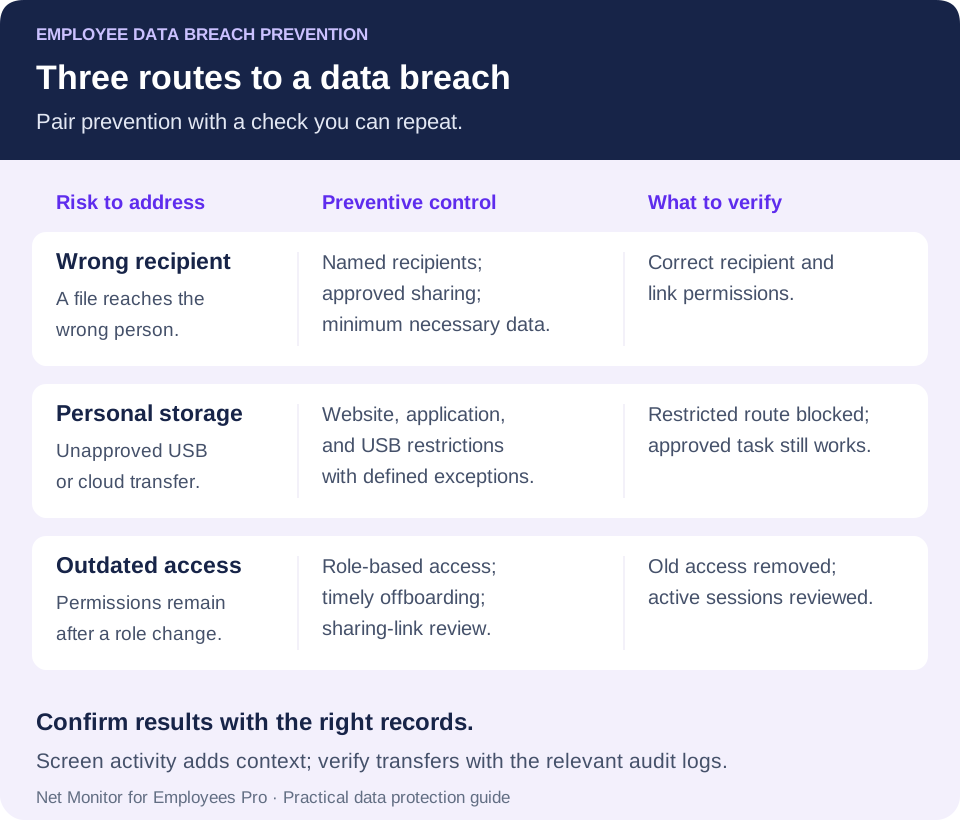
- Email: the data owner checks the recipient and minimum necessary fields; verify the sent message and permissions rather than assuming recall succeeded.
- Shared link: the service owner checks named recipients, expiry, and external access; test with the intended recipient account.
- Personal sync app: IT provides the approved repository and tests application restrictions; a blocked website does not control every synchronization client.
- Removable storage: IT verifies restriction scope and the approved handover route. Follow the USB storage control guide before applying a broad rule.
02Prevent employee data breaches with endpoint control
Employee data breaches are not all intentional. A salesperson may save a proposal to a personal cloud folder to work from home. A manager may send a spreadsheet containing employee information through an unsecured channel. An employee may install a file-sharing tool that bypasses existing controls. Intent matters when assessing the incident, but it does not remove the need to contain the exposure.
Start with company-owned computers and the systems that hold valuable information. IT should know which devices are active, who uses them, what software is installed, and whether basic protections are enabled. A device that has not checked in for weeks, an unknown remote-access tool, or unnecessary local administrator access should trigger review. Keep operating systems and security software updated, and manage device encryption through your endpoint security platform.
Endpoint administration gives IT a way to correct problems rather than merely document them. Restrict removable storage where the job does not require it. Block unapproved cloud storage, webmail, remote-control tools, and file-transfer sites where appropriate. Use operating-system privileges and software deployment policies to limit unauthorized installations. Remove local administrative rights from employees who do not need them. These controls may require exceptions for legitimate work, so establish a quick, documented approval process.
Match each control to the route you need to protect
In Net Monitor for Employees Pro, Internet Control provides website allow and block rules, while Blocking Applications defines which applications may run. A rule that prevents a program from running is different from removing installation privileges. Test the intended website, browser, and application on your managed computers before relying on a rule.
The Tools and Restrictions help describes Lock USB drives and Disable Printing, along with their scope. Immediate Tools actions apply to selected computers; persistent settings on the Restrictions tab apply globally to employee computers. Confirm that scope before enabling a restriction, and test platform support and the effect on approved work.
The goal is to let employees complete approved work without turning convenience into an uncontrolled route for customer records, financial data, source files, or internal documents to leave the company. Keep a working alternative available whenever a transfer route is restricted.
03Limit access before it becomes an exposure
Reducing unnecessary access is a practical way to lower breach risk. Employees should have access to the files, applications, and records required for their current role, rather than every resource they might possibly need someday. This is the principle of least privilege: keep permissions aligned with real work.
Review permissions when people are hired, change departments, take temporary assignments, or leave the business. Access changes often lag behind job changes, leaving contractors or transferred employees with credentials and folders they no longer need. Offboarding deserves particular attention. Disable accounts at the agreed departure time, recover company devices, revoke tokens and remote access, and rotate any shared credentials the person knew. Review external collaborators and active sharing links as well as the main user account.
Use separate accounts for administrative work and daily work. Checking email or browsing with a privileged account expands the potential damage from a phishing message or malicious download. Require multi-factor authentication for email, cloud applications, remote access, and administrative systems where supported. MFA reduces the usefulness of a stolen password, but it does not stop an authorized user from misusing their access. NIST's small-business MFA guidance also explains why phishing-resistant authentication is worth prioritizing for sensitive information and privileged accounts.
Sensitive data needs a clear owner. If nobody is accountable for a shared folder, customer database export, or financial reporting drive, permissions tend to accumulate. Assign responsibility for approving access and set a review schedule. A quarterly review can be a starting point for a small business, with more frequent checks for sensitive data and reviews whenever roles change. Record which access was removed and verify that the change took effect.
04Watch for activity that needs review
A breach investigation should not depend on a customer reporting fraud or confidential information appearing outside the business. Managers and IT need enough endpoint visibility to identify activity that does not fit the employee's role or normal workflow, then check the context promptly.
Useful warning signs, where your endpoint, file-server, identity, or cloud logs make them observable, include:
- Large file copies to USB drives, personal cloud storage, or unfamiliar network locations.
- Repeated access to folders outside an employee's department or job function.
- Unapproved use of webmail, file-sharing sites, screen-capture tools, or remote-access software.
- Unusual file collection, printing, or account activity around a role change or departure.
No single signal proves misconduct. A finance employee may legitimately export reports at month-end, and a remote worker may need an approved transfer method while traveling. A resignation alone is not evidence of a breach. Review the activity against policy, job duties, and approved exceptions, and ask questions while the facts are still available.
Desktop monitoring and activity logging can provide context. Live screen views show what is happening on a company computer, while activity reports can narrow a review by computer, user, and time range. Website and application records may show use of a risky tool. Where specifically justified and authorized, captured keystroke records can add context but also contain highly sensitive information. None of these records, by themselves, proves that a particular file left the business. Correlate relevant activity with file-access, email, or cloud audit logs to establish the destination and scope of any transfer.
Net Monitor for Employees Pro combines live screen monitoring, recording, activity reports, and endpoint controls so authorized administrators can investigate an event and apply supported restrictions from a central console. The operational value is to inspect the workstation, review available records, and control a relevant application, website, or device route. Pair that visibility with your identity, email, and data-protection controls; do not assume monitoring is a complete data loss prevention system or an automatic file-exfiltration detector.
For more detail on assessing suspicious behavior, see the insider threat monitoring guide. Here, the priority is preventing everyday data-handling mistakes and limiting the damage a compromised or misused employee account can cause.
05Build data-handling policies employees can follow
A vague instruction to protect confidential information leaves employees guessing. A usable data-handling policy names sensitive information, identifies approved storage and sharing methods, and states which actions are prohibited. Make the approved route easy to find at the moment someone needs to send a file.
Be specific about personal email, consumer cloud drives, USB devices, personal messaging apps, screenshots, printing, and personal devices. If an employee needs to work remotely, provide an approved method for access and sharing. People may choose a quick workaround when the approved process is slow or unclear. Document who can approve an exception, why it is needed, its scope, and when it ends.
Make safer sharing part of the normal workflow
Before sharing sensitive information, check the recipient's identity, remove unnecessary fields, and use an approved service with appropriately limited access. Prefer a named recipient over an unrestricted public link when the workflow allows it. For recurring exports, define the minimum dataset and an owner who can review the destination and permissions.
Training should use situations your team encounters. Show a project manager how to share a client file securely. Explain why HR documents belong in an approved repository. Tell employees how to respond when a customer requests an insecure transfer. Give staff a clear way to report a mistaken email, lost device, or suspicious request immediately. Fast reporting can limit harm, even when the original disclosure cannot be undone.
Include requests that impersonate a manager or supplier. Verify an unusual request for sensitive records through a known contact channel rather than relying on details in the message. NIST's phishing guidance provides practical examples for recognition and reporting. Make it clear that reporting a suspected mistake promptly is expected.
Disclose monitoring and govern it through written policy. Have the appropriate legal and privacy advisers assess the requirements for your employees' locations and working arrangements. Define the purpose of monitoring, what is collected, who can review it, and how long it is retained. Clear scope and controlled access help prevent monitoring records from becoming an unmanaged source of sensitive information themselves.
06Protect incident evidence as carefully as business data
For a suspected disclosure, preserve the relevant sources and use a documented evidence register. Keep prevention focused on closing the exposed transfer route while the incident lead coordinates investigation.
Set retention rules based on business purpose, risk, and applicable requirements, with enough storage to support them. When a specific incident or authorized investigation requires preservation, protect the relevant recordings, reports, and system logs from routine deletion. A departure should trigger an access review; it should not automatically justify collecting everything indefinitely. Restrict access to retained records because they may contain credentials, customer information, or private business communications.
Storage design matters. Protect recordings and logs in transit and at rest, maintain appropriate backups, and test retrieval by authorized administrators. Local storage, a secure server, or approved cloud storage can each fit different requirements. Choose a design that supports reliable recovery, controlled access, and retention without creating another uncontrolled copy of sensitive activity data.
For recordings made with Net Monitor for Employees Pro, review the recording encryption settings and protect the key backups. Recording encryption is configured separately from the storage location and should not be assumed to encrypt every activity report or exported file. Check screen recording retention and report retention separately. Preserve the original evidence, document when and how it was collected, and work from a copy when your investigation procedure calls for one.
07Respond quickly to a suspected employee data breach
A suspected breach calls for measured action. Notify the designated incident lead, preserve relevant evidence, and contain ongoing exposure according to your response plan. Do not delay urgent containment while waiting to collect every record. Avoid uncoordinated confrontation, device wiping, or cleanup that could destroy useful evidence. Capture relevant activity, note dates and systems involved, and protect the affected endpoint.
Depending on the event, containment may mean disabling an account, revoking active sessions or sharing links, blocking a website or application, changing credentials, or restricting a company computer. Keep the response proportional to the facts. For a misdirected email, attempt recall where available, but do not assume recall removes every copy; involve the incident lead to assess exposure and next steps. Suspected deliberate copying may require coordinated security, HR, and legal involvement. Assign decisions about notifications to the responsible people based on the incident and applicable obligations.
Maintain a short incident record: the reporter, time discovered, affected accounts and devices, data involved, known destinations, containment actions, and the owner of each next step. Separate confirmed facts from unanswered questions. NIST's incident response guidance treats preparation, detection, response, and recovery as connected parts of managing cybersecurity risk.
Finally, identify the control failure. Was an employee given more access than necessary? Did a blocked service remain available through another route? Was there no approved method for legitimate remote work? Every incident should produce a concrete correction, an owner, and a verification step rather than only a reminder to be careful.
08An employee data breach prevention checklist
Start with one sensitive workflow, such as sending customer exports or processing payroll, and verify the complete path before expanding controls across the business:
- Name the data owner. List the approved users, storage location, and sharing destination.
- Remove unnecessary access. Check role changes, shared accounts, external links, and departure procedures.
- Test a restricted route. Use a harmless test file to verify the intended website, application, or USB restriction without exposing real customer information.
- Test approved work. Confirm that employees can still complete the legitimate task and request an exception when needed.
- Verify records and reporting. Retrieve the relevant activity and audit records, check timestamps, and rehearse who receives an incident report.
Review both security and usability: an exception that stays open after the task is finished is a control gap, while a blocked approved workflow encourages workarounds. Record the adjustment and repeat the affected check.
Employees should be able to do approved work efficiently, while authorized administrators can see, control, and investigate activity that puts business data at risk. Put those controls in place before a routine workday turns into a breach response.
09Employee data breach prevention questions
How can a small business prevent employee data breaches?
Start by identifying sensitive information and its owner, limiting access by role, and providing an approved sharing method. Add MFA, managed endpoint controls, practical training, and a clear reporting route. Test restrictions and incident-record retrieval with harmless sample data before relying on them.
Can employee monitoring prevent every data leak?
No. Monitoring supplies visibility and context, while supported endpoint restrictions can reduce specific opportunities for misuse. It does not replace identity controls, email and cloud security, or a dedicated data loss prevention capability where one is required. Verify which events your tools actually capture.
Should we block all USB drives and personal cloud storage?
Choose controls based on the data and the job. Restrict unapproved transfer routes, provide a workable alternative, and document necessary exceptions. Test the scope of a rule before rollout so an intended restriction does not interrupt an approved business process.
What should an employee do after sending a file to the wrong person?
Report it immediately through the company's incident channel and preserve the message details. The incident lead can assess the data, recipient, and available containment options. A recall attempt may help in some environments, but it does not prove the disclosure was reversed.
What evidence helps investigate a suspected employee data breach?
Preserve the relevant account and device identifiers, timestamps, file or message details, sharing destinations, and available audit logs. Screen recordings and activity reports can add context. Protect the records, document their collection, and distinguish a suspicious action from proof that information was transferred.