Pricing & budgeting
Employee Monitoring Software Cost: A Practical Budget
Compare permanent licenses and Cloud subscriptions, then build a realistic 25-computer budget that includes rollout, recording storage and the time needed to run the system.

01How much does employee monitoring software cost?
Employee monitoring software cost depends on how many computers you monitor, how they connect, and the work required to run the system. A monthly price is only one part of the budget. A permanent license can remove a recurring license charge, but deployment, recording storage and review time still need an owner and a cost estimate.
For a concrete starting point, Net Monitor for Employees Pro offers commercial LAN/WLAN/VPN licenses from USD 299.95 for five monitored computers. Cloud connectivity is available at USD 89.95 per computer per year or USD 9.95 per computer per month. Both models include unlimited administrator consoles. The right choice depends on the connection your computers need, rather than the lowest headline figure.
| License | Monitored computers | Published price | Connection and term |
|---|---|---|---|
| Commercial | 5 | USD 299.95 | Permanent LAN/WLAN/VPN license |
| Commercial | 10 | USD 499.95 | Permanent LAN/WLAN/VPN license |
| Commercial | 25 | USD 1,199.95 | Permanent LAN/WLAN/VPN license |
| Commercial | 50 | USD 2,359.95 | Permanent LAN/WLAN/VPN license |
| Commercial site | Unlimited in one building | USD 2,999.95 | Permanent LAN/WLAN/VPN license; location restriction applies |
| Cloud, yearly | 1 per subscription quantity | USD 89.95 per year | Internet connectivity; also usable on LAN/WLAN/VPN |
| Cloud, monthly | 1 per subscription quantity | USD 9.95 per month | Internet connectivity; also usable on LAN/WLAN/VPN |
These are product-specific prices, not a claimed market average. Compare the current commercial license options and Cloud subscription prices before approving a purchase. Schools and eligible non-profit organizations should also check the educational license section on the order page.
02Count computers and choose the connection first
Start with an endpoint list, not payroll headcount. Twenty employees may use twenty laptops plus five shared workstations. Conversely, several shifts may use the same computers. For the product prices above, the purchasing unit is the monitored computer; administrator consoles are unlimited. Ask for confirmation of the licensing treatment of terminal servers or unusual shared-session environments before using a simple employee count.
Next, separate machines reachable through your existing LAN or VPN from those that need the product’s Cloud connection over the Internet. A permanent LAN/VPN license does not include the Cloud subscription. A Cloud license can also be used on a local network, so do not automatically add a permanent license for the same computer on top of its Cloud subscription. Confirm the intended configuration when requesting a quote.
A site license is not an unrestricted worldwide license. The commercial site offer requires all covered computers to be in one building. If staff move between offices and home, describe that arrangement before selecting the site option. Use the remote deployment guide to check connectivity; use this article to put a price against the arrangement you can actually operate.
The useful comparison
Compare the same computer count, required connection and budget period. A one-time LAN/VPN license and an Internet subscription solve different connectivity requirements; their prices alone do not establish which is better for your team.
03Build a total cost of ownership budget
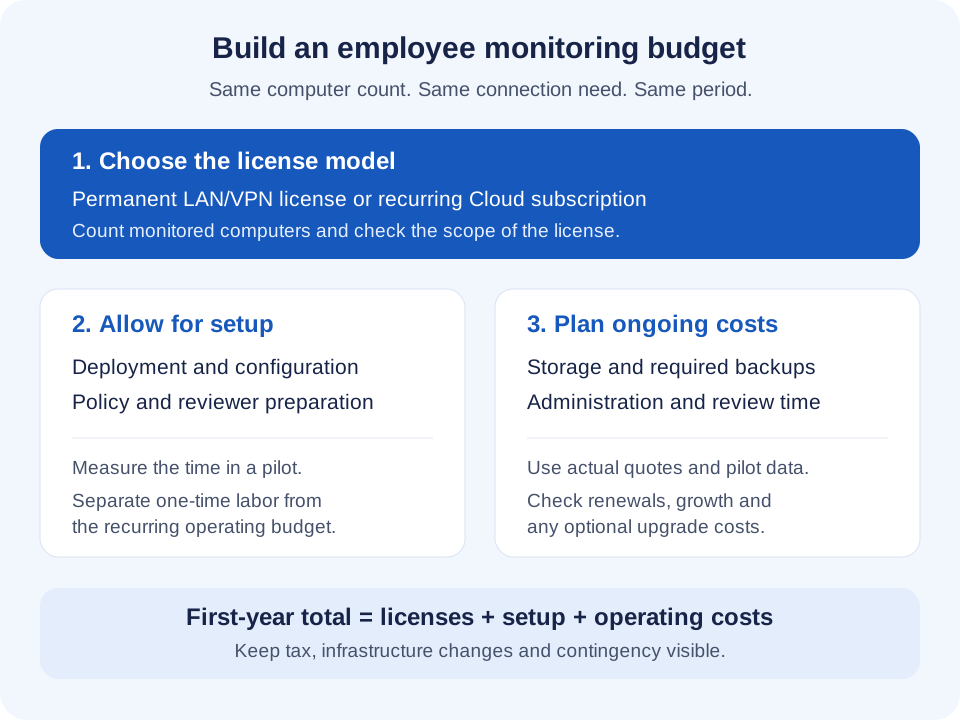
A useful first-year estimate has five lines: licenses, deployment, policy preparation, storage, and ongoing administration. Keep one-time setup work separate from recurring costs so the second-year budget is easy to explain.
Licenses and future changes
Record the quantity, billing interval, connection type and expected growth. A permanent license that never expires does not, by itself, establish an entitlement to every future major upgrade or a particular support service. Confirm upgrade eligibility, support terms and any expansion charges in writing where these affect the decision.
The product website advertises free support. Budget your own deployment and review time separately, and confirm any response-time requirements before relying on a particular support arrangement.
Deployment and policy preparation
Allow time to install the console and agents, verify connections, configure the intended collection settings, and test the first reports. Include the time needed to explain the monitoring scope to employees, assign reviewers and approve retention periods. The LAN/VPN installation help and workplace surveillance policy checklist help identify the tasks; the pilot tells you how long they take in your environment.
Recording storage and retrieval
Storage costs depend on what you collect and how long you keep it. Continuous video, selected recordings and activity records can have very different footprints. Do not assume that a Cloud connection subscription includes unlimited recording storage. Choose the destination separately, then check capacity, access, backup and any provider transfer charges. The external recording storage documentation explains supported destinations and configuration.
Estimate retained data from measurements: measured GB per computer per recording day × recorded computers × retention days. Add the backup or redundancy allowance that your design actually uses. For example, a pilot measuring 0.4 GB per computer per day across 25 computers with 20 retained recording days needs about 200 GB before backups and spare capacity. This is an illustration of the calculation, not a product storage benchmark.
Administration and review
Someone must maintain the computer list, handle access changes, review relevant reports and answer employee or manager questions. Budget that time explicitly. An administrator’s loaded hourly rate is useful for comparing options, even when the work is performed by an existing salaried employee rather than an external technician.
04A worked budget for 25 company computers
The example below uses the published 25-computer commercial license and Cloud subscription rates. All other amounts are planning assumptions: eight hours for deployment, two hours for policy preparation, an internal labor rate of USD 45 per hour, a USD 20 monthly storage allowance, and two hours of administration and review each month. Replace these figures with pilot results and actual storage quotes.
| Budget item | Permanent LAN/VPN | Cloud, billed yearly | Cloud, billed monthly |
|---|---|---|---|
| License or subscription for year one | 1,199.95 | 2,248.75 | 2,985.00 |
| Deployment: 8 × 45 | 360.00 | 360.00 | 360.00 |
| Policy preparation: 2 × 45 | 90.00 | 90.00 | 90.00 |
| Storage allowance: 20 × 12 | 240.00 | 240.00 | 240.00 |
| Administration and review: 2 × 12 × 45 | 1,080.00 | 1,080.00 | 1,080.00 |
| First-year total | 2,969.95 | 4,018.75 | 4,755.00 |
The Cloud calculations are 25 × USD 89.95 = USD 2,248.75 per year, or 25 × USD 9.95 = USD 248.75 per month. Twelve monthly payments total USD 2,985.00. At these rates, annual billing is USD 736.25 lower for a full year of 25 Cloud subscriptions, but requires the annual commitment. A short project or changing computer count may justify the flexibility of monthly billing; confirm renewal and cancellation terms before ordering.
The non-license allowance is USD 1,770 in each first-year scenario. That is why a license-only comparison understates the operating budget. In a later year, the unchanged permanent-license scenario would still need USD 1,320 for the assumed storage and review work, even with no recurring license subscription. New computers, infrastructure, upgrades or a changed monitoring scope would require a revised estimate.
The LAN/VPN scenario assumes a suitable network or VPN already exists. If it does not, price its implementation and maintenance separately rather than treating Internet connectivity as free. Likewise, two hours of monthly review is an input to test, not a promise that every organization can operate within that allowance.
05Keep costs proportionate to the business need
Start with the decisions you need the software to support. If the immediate question is application use, begin with relevant activity reports instead of enabling every recording feature. Add recording only where the extra evidence serves an approved purpose. This can reduce storage and review work without weakening the original purchasing goal.
Choose a retention period that matches the review process. Keeping material that no authorized reviewer will use increases storage and access-management work. Test whether records can be found and opened when needed before expanding retention. The screen recording planning guide covers the evidence and recording choices behind that estimate.
Include growth in the quote. For a team moving from 25 to 40 computers, ask how additional licenses are priced and how existing entitlements are treated; do not assume the difference between two published packages is automatically the upgrade price. Consider a site license only when its location conditions match the deployment.
Finally, avoid justifying the purchase by multiplying all idle minutes by salary. A computer can be idle while its user is doing legitimate offline work. Use measurable outcomes such as technician time saved on a repeated support task, faster retrieval of required records, or reduced administration across an existing process. Saved staff time represents available capacity; it becomes a cash saving only when an actual expense is reduced.
06Use the trial to replace estimates with measurements
The full-featured 30-day desktop trial lets you evaluate the application before buying. Select a small group that represents the operating systems, working locations and connection conditions in the planned rollout. Confirm any Cloud trial access needed for Internet-connected computers rather than assuming a desktop trial proves every remote setup.
- Time installation and configuration. Record both hands-on work and time spent resolving exceptions. Use those observations to estimate the remaining rollout.
- Measure the chosen collection settings. Record storage growth over representative working days and test retrieval from the intended destination.
- Run a real review. Give an authorized reviewer a specific business question and measure the time needed to reach a supported answer.
- Confirm the purchase scope. Count monitored computers, select the connection model, and ask about site eligibility, renewals, upgrades and future expansion.
- Approve a first-year and recurring budget. Keep invoices, internal labor estimates and optional contingency separate so the next review can compare like with like.
For the wider product selection decision, use the employee monitoring software evaluation checklist. The budget is ready when every cost has a quantity, a period and a reason, and the trial has tested the assumptions most likely to change it.
07Employee monitoring software cost: common questions
Is employee monitoring software priced per employee or per computer?
Pricing units vary between products. Net Monitor for Employees Pro licenses the computers being monitored and includes unlimited administrator consoles. Count devices and confirm special shared-session configurations before calculating the order quantity.
Can I buy employee monitoring software with a one-time payment?
Yes. Net Monitor for Employees Pro offers permanent commercial and educational licenses for LAN, WLAN and VPN use. The separate Cloud connection is subscription-based. A permanent license removes a recurring license subscription, not every operating cost.
Is yearly Cloud billing cheaper than monthly billing?
At the prices checked for this article, one computer costs USD 89.95 for a year or USD 119.40 across twelve USD 9.95 monthly payments. The difference is USD 29.45 per computer for a full year. Compare the commitment with your expected usage period and confirm current checkout terms.
Does a Cloud license include unlimited recording storage?
Do not budget on that assumption. The Cloud license description covers connectivity through the Cloud server. Recording destinations, capacity, retention and any storage-provider charges should be planned separately.
What costs should I check beyond the license?
Include installation, configuration, policy preparation, storage, backup, administrator time, report review, applicable taxes and any network changes. Confirm support, upgrade and expansion terms where relevant. Use measured pilot figures instead of an unsupported return-on-investment claim.